MCP Server Integration (Experimental)
Since MCP is a very young and volatile standard, this feature is experimental and subject to change in future releases. The Pimcore BC promises do not apply to this feature yet.
The Simple Rest Datahub provides a Model Context Protocol (MCP) server endpoint, enabling AI agents and LLMs to directly access and query Pimcore data.
Activating MCP Server
MCP server must be enabled per configuration in the Delivery Settings.
- Open your Datahub Simple Rest configuration
- Navigate to Delivery Settings tab
- Activate Enable MCP Server checkbox
- Ensure an API Key is configured (required for authentication)
- Save configuration
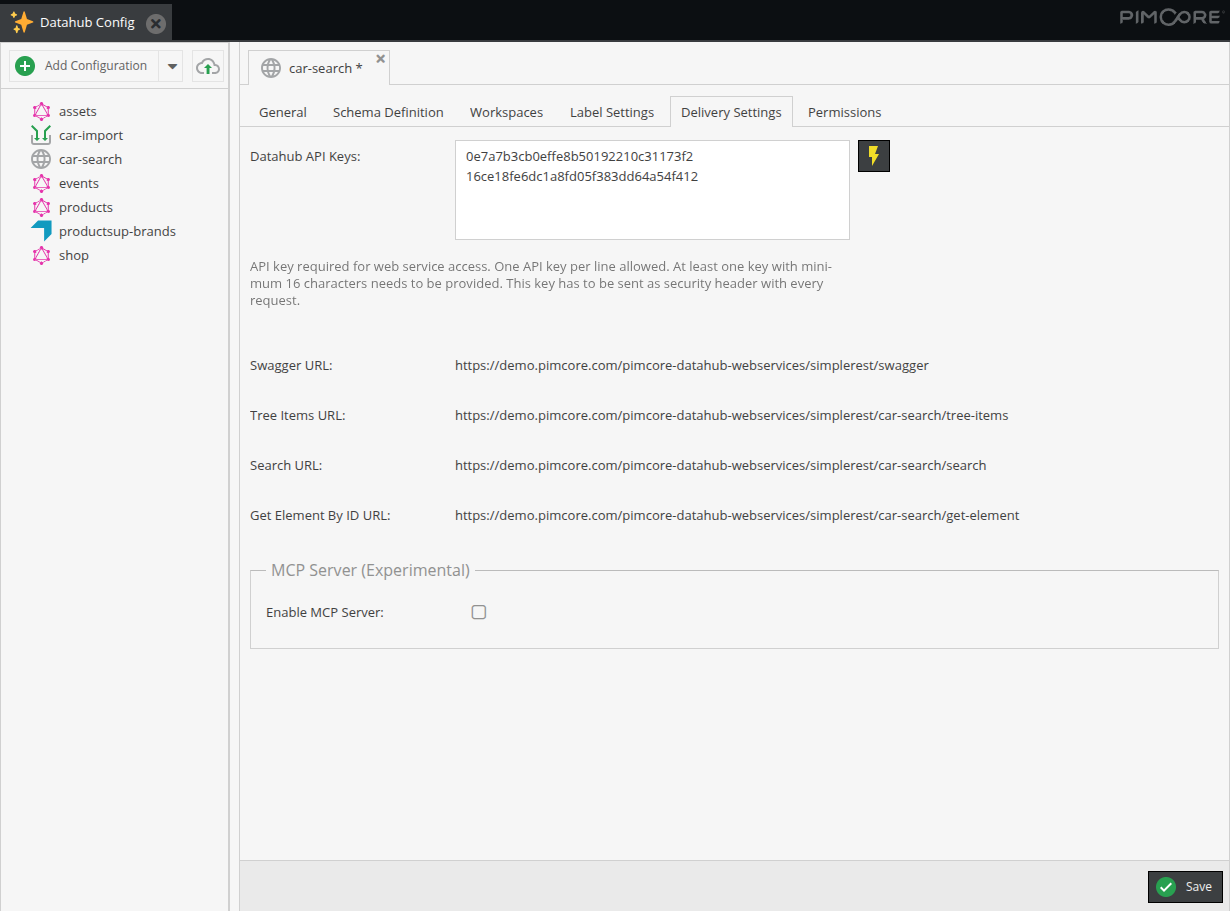

Note: Configuration must be active and have a valid API key for MCP access.
Exposed Capabilities
- The MCP server is available via
https://your-pimcore-instance.com/pimcore-datahub-webservices/simplerest-mcp - Available Datahub endpoints depend on MCP activation and API key (see also Authentication section).
Tools
pimcore_datahub_list_configs
- Lists all accessible Datahub configurations
- Returns configuration names and descriptions. Use speaking descriptions to help AI agents select the right configuration
pimcore_datahub_search
- Search and retrieve objects and assets from indexed data
- Supports fulltext search, advanced query strings, and filters
- Includes pagination, sorting, and aggregation options
- Returns structured JSON with system metadata and custom fields
pimcore_datahub_tree_items
- Navigate and browse hierarchical tree structure of objects and assets
- Retrieve child elements under a specific parent node
- Supports filtering and search within a specific branch
- Ideal for tree-based navigation and folder browsing
- Returns items with hasChildren flag for further navigation
pimcore_datahub_get_by_id
- Retrieve a single specific element (object or asset) by its unique ID
- Most direct and efficient way to fetch one known element
- Returns complete data including all configured fields and system metadata
- Essential for detail views, relationship traversal, and data validation
Resources
pimcore://datahub/configurations
- Provides configuration metadata as a resource
- Alternative to the list_configs tool
- Returns JSON with available configurations and usage instructions
Authentication
MCP server uses Bearer token authentication with the same API keys as REST endpoints.
Depending on matching API key, different configurations can be accessed.
The token must be included in the Authorization header of each request done by the agent:
Authorization: Bearer <api-key>
API Key Configuration
- Each configuration has its own API keys (configured in Delivery Settings)
- API key grants access to the specific configuration
- It is possible to define same API key for multiple configurations to allow MCP server access to all of them
Example Integration: VSCode
Add to VSCode configuration (mcp.json):
{
  "servers": {
    "pimcore-simple-rest-mcp": {
      "url": "https://your-pimcore-instance.com/pimcore-datahub-webservices/simplerest-mcp",
      "type": "http",
      "headers": {
        "Authorization": "Bearer YOUR_API_KEY_HERE"
      }
    }
  }
}
Security Considerations
- MCP server respects workspace permissions configured in the Datahub, no additional data is exposed
- API keys should be kept secure and rotated regularly
- Each configuration can use a separate API key for granular access control
- Use HTTPS in production to encrypt API keys in transit