GDPR Data Extractor
The GDPR Data Extractor supports the right of access by the data subject by searching and exporting personal data across data objects, sent mails, Pimcore users, and custom providers.
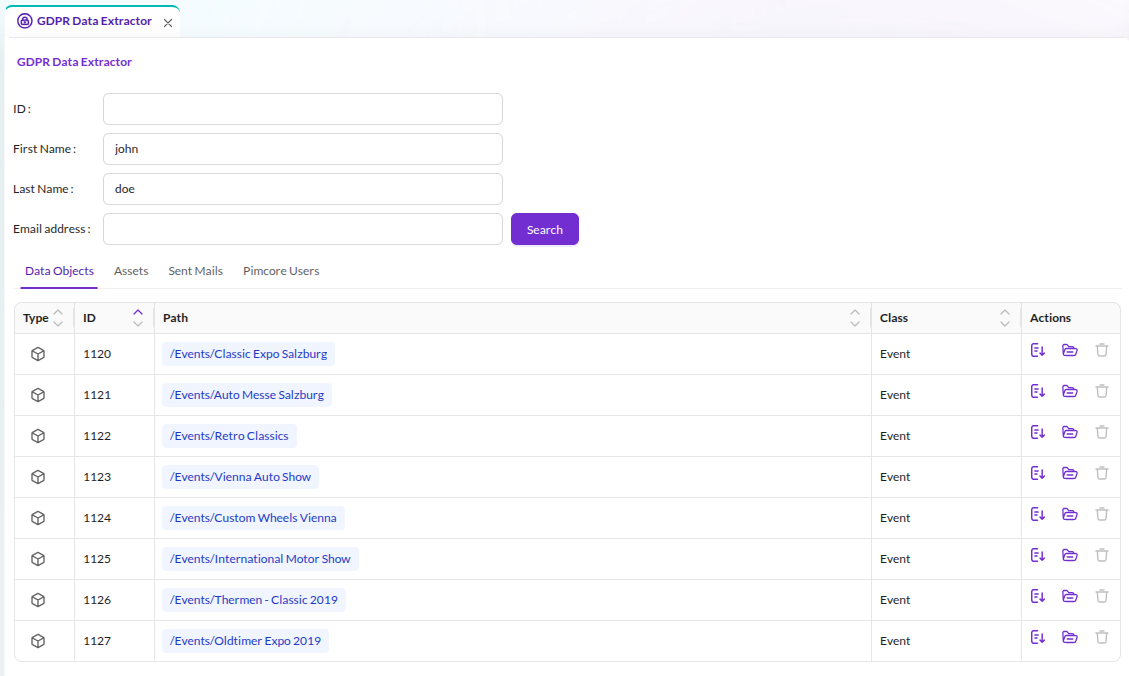

Configuration
Define which data object classes and asset types the Data Extractor includes, and whether the result view allows direct deletion:
pimcore_studio_backend:
    gdpr_data_extractor:
        # Settings for DataObjects DataProvider
        dataObjects:
            # Configure which classes should be considered, array key is class name
            classes:
                Person:
                    allowDelete: true    # Allow delete of objects directly in preview grid (default: false)
                Customer:
                    allowDelete: false
        # Settings for Assets DataProvider
        assets:
            types:
                # Configure which asset types should be considered
                - image
                - document
                - video
By default, the search covers all data object classes, the export includes all attributes directly on the data object, and deletion from the result list is off.
Extending with Custom Data Sources
Add custom data sources to the GDPR Data Extractor to include application-specific data exports or external systems. Each custom provider requires both a PHP backend and a React/TypeScript frontend.
The Studio Example Bundle provides a complete working example (backend + frontend).
Backend: Implement the Data Provider
Implement Pimcore\Bundle\StudioBackendBundle\Gdpr\Provider\DataProviderInterface:
| Method | Description |
|---|---|
findData(FilterParameter $filter): Collection | Search data based on filter parameters |
getName(): string | Display name for the provider tab |
getKey(): string | Unique identifier |
getSortPriority(): int | Display order (higher = first) |
getRequiredPermissions(): array | Permission strings required to access this provider |
getSingleItemForDownload(int $id): array|Response | Export a single item for download |
Your provider class must accept an array $gdprConfig = [] constructor parameter. A compiler
pass injects the pimcore_studio_backend.gdpr_data_extractor configuration into every tagged
provider. The container fails to build if the parameter is missing.
Register the service with the pimcore.studio_backend.gdpr_data_provider tag:
services:
    App\Gdpr\DataProvider\MyCustomDataProvider:
        tags:
            - { name: pimcore.studio_backend.gdpr_data_provider }
See the backend example and its service registration in the Studio Example Bundle.
Frontend: Register a Dynamic Type Provider
The GDPR Extractor uses the Pimcore Studio dynamic type system to render a tab for each data provider. Every backend provider needs a corresponding frontend class that defines what the tab displays. Implement it as a Pimcore Studio plugin (Module Federation bundle).
The built-in providers use this pattern:
| Backend Provider | Frontend Dynamic Type | Key |
|---|---|---|
DataObjectProvider | DynamicTypeDataObjectGDPRProvider | data_objects |
AssetsProvider | DynamicTypeAssetsGDPRProvider | assets |
PimcoreUserProvider | DynamicTypeUsersGDPRProvider | pimcore_users |
SentMailProvider | DynamicTypeEmailsGDPRProvider | sent_mails |
A custom provider frontend requires three steps, each linking to the corresponding source file in the Studio Example Bundle's GDPR Data Extractor example:
Step 1: Tab Component
Create a React component that renders search results as a grid. The component receives data
from the GDPR framework via GDPRProviderTabProps and maps it to table columns using
TanStack Table's createColumnHelper. The SDK provides an ExportButton that triggers
the backend's getSingleItemForDownload() for each row.
See: components/my-provider-tab.tsx
Step 2: Dynamic Type Class
Create a class extending DynamicTypeAbstractGDPRProvider that connects your tab component
to the GDPR framework. The id property must match the getKey() return value of your
backend provider.
See: dynamic-types/dynamic-type-my-provider.tsx
Step 3: Plugin and Module Registration
Register the dynamic type in the plugin's onInit via the DI container, then register a module
in onStartup that hooks it into the DynamicTypeGDPRProviderRegistry.
See: index.ts (plugin) and modules/my-provider-module.ts
How the Framework Pairs Providers
The framework matches each backend provider to its frontend tab by key: the backend's
getKey() return value must equal the frontend dynamic type's id. When a user opens the
GDPR Data Extractor, Pimcore Studio fetches the provider list from the backend API and
renders a tab for each provider that has a matching frontend registration.
Further Reading
- Extending GDPR Data Providers - detailed backend reference with full code example and configuration options table
- GDPR Data Extractor Plugin Example - frontend plugin overview linking to the Studio Example Bundle