Notes & Events
General
Notes & Events log changes or events on elements independently from versioning. Use them to record actions by marketers, editors, automated importers, or synchronizations - anything not captured in the data itself but relevant for context.
Use Cases
- An importer that logs which field values it changed on an object
- A marketer recording SEO optimizations performed on a document, e.g. "optimized for keyword xyz"
Create Notes & Events
Using the API
use Pimcore\Model;

$object = Model\DataObject::getById(4);

$note = new Model\Element\Note();
$note->setElement($object);
$note->setDate(time());
$note->setType("erp_import");
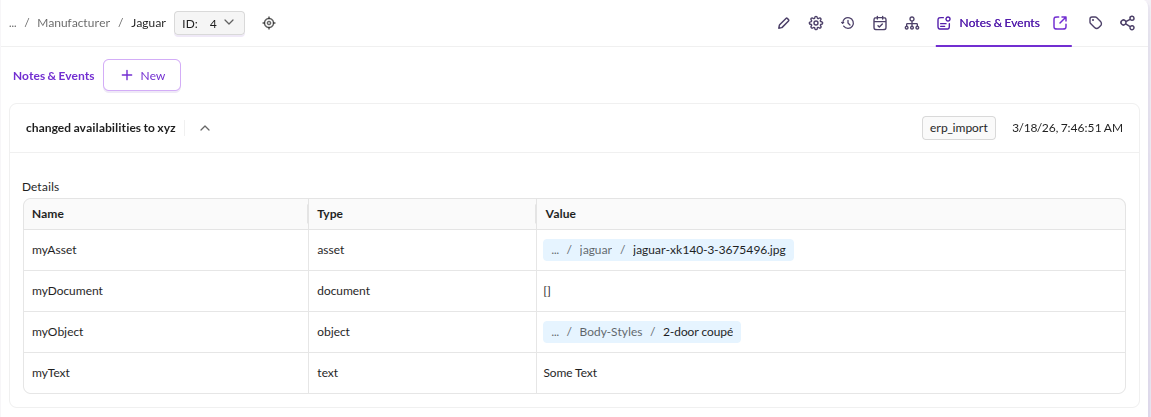
$note->setTitle("changed availabilities to xyz");
$note->setUser(0);

// attach additional data of various types
$note->addData("myText", "text", "Some Text");
$note->addData("myObject", "object", Model\DataObject::getById(7));
$note->addData("myDocument", "document", Model\Document::getById(18));
$note->addData("myAsset", "asset", Model\Asset::getById(20));

$note->save();
The resulting entry in Pimcore Studio:

Note: Note titles are translatable (studio domain). Avoid variable text in titles to prevent unintended translation entries. Use the description or data fields for dynamic details instead.
Add Notes in Pimcore Studio
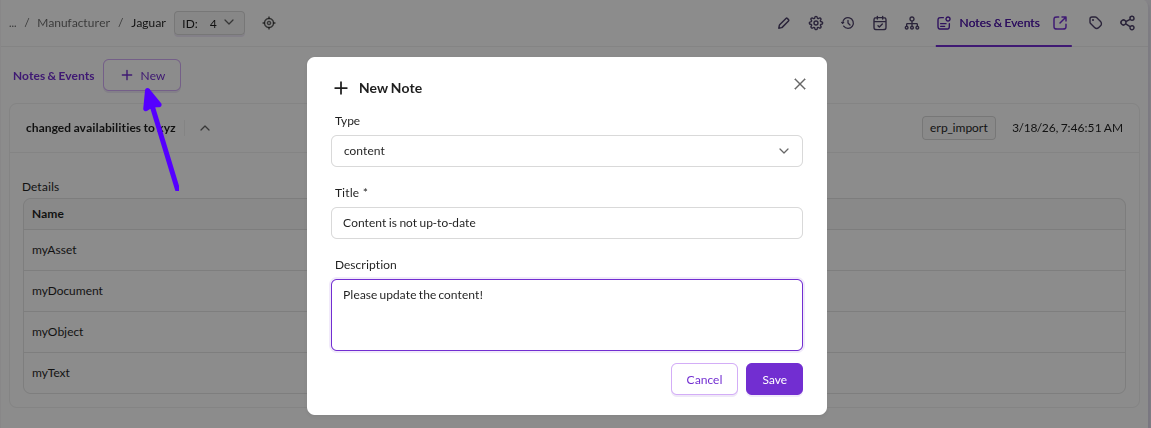
Add notes directly from the edit view of any object, document, or asset:

Custom Note Types
Configure the selectable note types per element type (asset, document, data object):
# config/config.yaml or any other Symfony config file

pimcore_studio_backend:
    notes:
        types:
            asset:
                - ''
                - content
                - seo
                - warning
                - notice
            document:
                - ''
                - content
                - seo
                - warning
                - notice
            data-object:
                - ''
                - content
                - seo
                - warning
                - notice
The defaults are content, seo, warning, and notice. Override them per element type as shown above.
The key for data objects is data-object (hyphenated).
For more details on extending note types, see the Extending Notes guide in the Studio Backend Bundle documentation.