Application Logger
To use this feature, enable the PimcoreApplicationLoggerBundle in your bundle.php file
and install it:
bin/console pimcore:bundle:install PimcoreApplicationLoggerBundle
General
The Application Logger bundle lets developers log events and errors within a Pimcore application.
View and search logs in Pimcore Studio under System -> Application Logger:
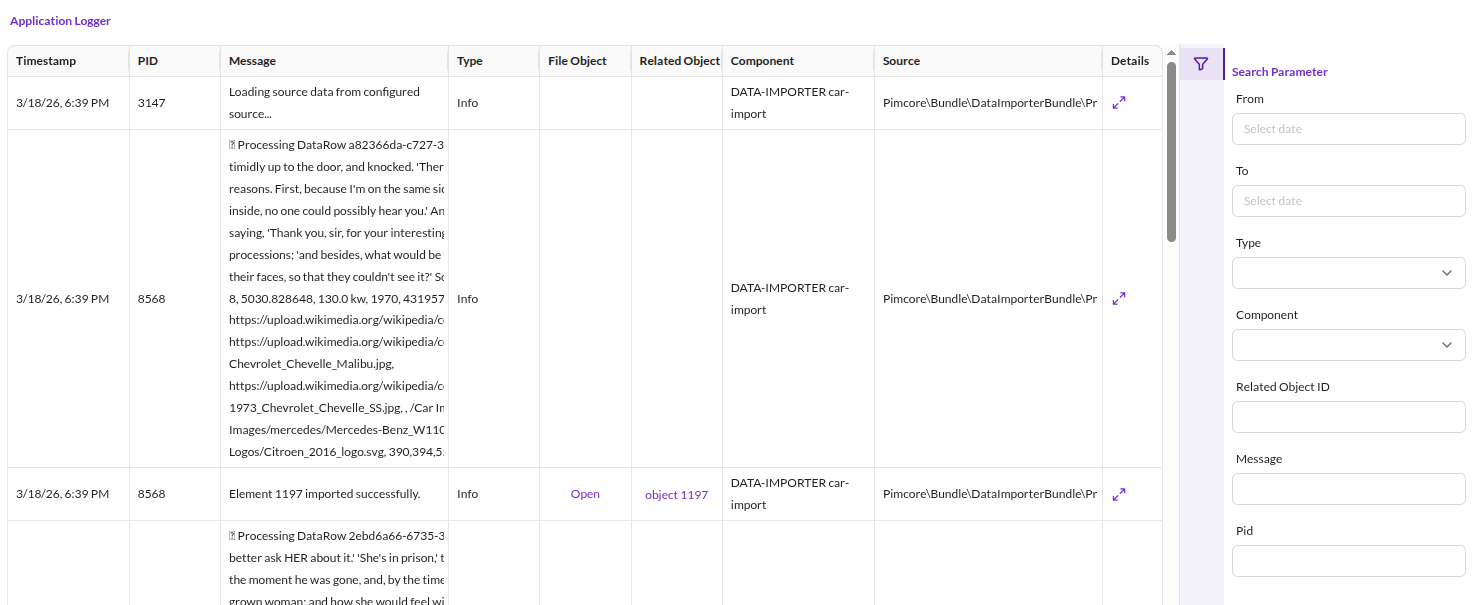

Configuration
Configure the Application Logger in your project's YAML configuration under the pimcore.applicationlog key.
Full Configuration Reference
pimcore:
    applicationlog:
        loggers:
            db:
                # Minimum log level or a list of specific levels to capture
                # Default: 'debug'
                min_level_or_list: 'debug'  # or ['debug', 'info'] for specific levels
                # Maximum log level to capture
                # Default: 'emergency'
                max_level: 'emergency'
        mail_notification:
            # Enable email summaries of log entries
            # Default: false
            send_log_summary: false
            # Minimum priority for entries included in the email summary.
            # Use the level name or its numeric value:
            # 8 (debug), 7 (info), 6 (notice), 5 (warning),
            # 4 (error), 3 (critical), 2 (alert), 1 (emerg)
            # Higher values are more inclusive.
            # Default: null (all levels)
            filter_priority: null
            # Email addresses for log summaries, separated by ; or ,
            mail_receiver: 'admin@example.com; ops@example.com'
        # Number of days before log entries are moved to archive tables
        # Default: 30
        archive_treshold: 30
        # Optional separate database for archive tables.
        # Recommended for high-volume logging.
        # Default: '' (same database)
        archive_alternative_database: ''
        # Storage engine for archive tables (e.g. ARCHIVE, InnoDB, Aria, MyISAM).
        # When set to 'archive', auto-detects the best available engine.
        # Default: 'archive'
        archive_db_table_storage_engine: 'archive'
        # Number of months before archive tables are deleted
        # Default: 6
        delete_archive_threshold: 6
Log Level Filtering
Log all messages with level debug or info only:
pimcore:
    applicationlog:
        loggers:
            db:
                min_level_or_list: ['debug', 'info']
Log all messages from level info through emergency:
pimcore:
    applicationlog:
        loggers:
            db:
                min_level_or_list: 'info'
                max_level: 'emergency'
Mail Notifications
When send_log_summary is enabled, the defined receivers receive log entries by email
during the regular Pimcore maintenance cycle. The filter_priority controls which log
messages are included (e.g. only errors and above).
Log Archival
The archive function automatically creates database tables (application_logs_archive_YYYY_MM)
for log entry archival. In the example above, log entries move to archive tables after 30 days.
Archive tables are automatically deleted after the delete_archive_threshold (default: 6 months).
How to Create Log Entries
The Application Logger is a PSR-3 compatible component available as service
Pimcore\Bundle\ApplicationLoggerBundle\ApplicationLogger.
Basic Usage - Example
Controller / Action
<?php

namespace App\Controller;

use Pimcore\Bundle\ApplicationLoggerBundle\ApplicationLogger;
use Pimcore\Controller\FrontendController;

class TestController extends FrontendController
{
    // injected as action argument (controller needs to be registered as service)
    public function testAction(ApplicationLogger $logger): void
    {
        $logger->error('Your error message');
        $logger->alert('Your alert');
        $logger->debug('Your debug message', ['foo' => 'bar']); // additional context information
    }

    public function anotherAction(): void
    {
        // fetched from container
        $logger = $this->get(ApplicationLogger::class);
        $logger->error('Your error message');
    }
}
Dependency Injection
App\YourService:
    calls:
        - [setLogger, ['@Pimcore\Bundle\ApplicationLoggerBundle\ApplicationLogger']]
Or use autowiring:
services:
    _defaults:
        autowire: true

    App\YourService: ~
<?php

namespace App;

use Pimcore\Bundle\ApplicationLoggerBundle\ApplicationLogger;

class YourService
{
    /**
     * @var ApplicationLogger
     */
    private $logger;

    public function __construct(ApplicationLogger $logger)
    {
        $this->logger = $logger;

        $logger->debug('Hello from YourService');
    }
}
Usage as Monolog Handler
Instead of using the ApplicationLogger class directly, configure Monolog
to use the Application Logger as a Monolog handler.
Pimcore provides the ApplicationLoggerDb handler, preconfigured as a service:
monolog:
    handlers:
        # monolog allows us to register custom handlers via type: service
        # note that the only supported extra option besides type and id is channels
        application_logger_db:
            type: service
            id: Pimcore\Bundle\ApplicationLoggerBundle\Handler\ApplicationLoggerDb
            channels: ["application_logger"]
The channel(s) must exist. Create them by configuring them manually or by using DI tags to select the logger for the target channel. When using DI tags, Monolog creates the channel implicitly.
IMPORTANT: The
ApplicationLoggerDbhandler depends on the database connection. Exclude channels logging database queries (typically thedoctrinechannel) to avoid infinite loops. Either specify an allowlist of supported channels (as shown above) or exclude thedoctrinechannel by setting channels to["!doctrine"].
As the type: service handler config does not support filtering by log level,
use the filter handler type to wrap the Application Logger:
monolog:
    handlers:
        # The filter handler can be used to filter for a given log level.
        # Note that the supported channels are now configured on the filter
        # handler. To filter by level you can set accepted_levels or min_level and max_level.
        # See https://github.com/symfony/monolog-bundle/blob/master/DependencyInjection/Configuration.php#L97
        # for details.
        application_logger_filter:
            type: filter
            channels: ["application_logger"]
            handler: application_logger_db
            min_level: ERROR
        application_logger_db:
            type: service
            id: Pimcore\Bundle\ApplicationLoggerBundle\Handler\ApplicationLoggerDb
Combine this handler with other log handlers such as the Fingers Crossed Handler. See the Symfony Logging documentation for details.
Once the handler is configured, use it like any other Monolog logger by specifying a DI tag for the target channel:
<?php

namespace App\Controller;

use Psr\Log\LoggerInterface;

// we take a controller as example here, but this can be any service
// no need to extend a base controller here as we inject our dependencies
// via DI
class TestController
{
    private LoggerInterface $logger;

    public function __construct(LoggerInterface $logger)
    {
        $this->logger = $logger;
    }

    public function testAction(): void
    {
        $this->logger->error('Your error message');
    }
}
The service definition adds a DI tag to specify which logger to inject:
services:
    App\Controller\TestController:
        arguments:
            $logger: '@logger'
        tags:
            - { name: monolog.logger, channel: application_logger }
Autowire the logger channel by naming the argument as (channel name in camel case) + Logger.
Example for channel foo_bar:
  public function __construct(LoggerInterface $fooBarLogger)
  {
      $this->logger = $fooBarLogger;
  }
More details on Logging Channel Handlers.
Special Context Variables
Three context variables have special functionality: fileObject, relatedObject, component.
<?php

namespace App\Controller;

use Pimcore\Bundle\ApplicationLoggerBundle\ApplicationLogger;
use Pimcore\Bundle\ApplicationLoggerBundle\FileObject;
use Pimcore\Model\DataObject\AbstractObject;
use Symfony\Component\HttpFoundation\Response;

class TestController
{
    public function testAction(ApplicationLogger $logger): Response
    {
        $fileObject = new FileObject('some interesting data');
        $myObject   = DataObject::getById(73);

        $logger->error('my error message', [
            'fileObject'    => $fileObject,
            'relatedObject' => $myObject,
            'component'     => 'different component',
            'source'        => 'Stack trace or context-relevant information' // optional, if empty, gets automatically filled with class:method:line from where the log got executed
        ]);

        // ...
    }
}
In the Application Logger grid, the new row appears as my error message with a related object.
Click the row to navigate to the object editor via the Related object edit icon in the popup.
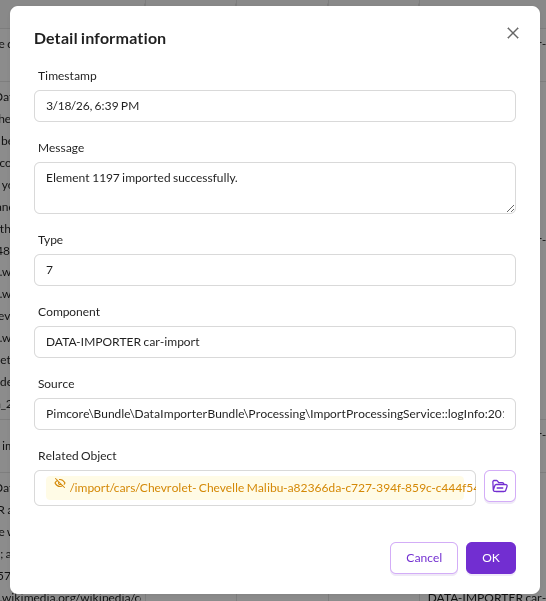

Logging Exceptions
The Application Logger provides a helper method to log exceptions
and implicitly create a FileObject from the exception:
<?php

use Pimcore\Bundle\ApplicationLoggerBundle\ApplicationLogger;

$exception = new \RuntimeException('failed :(');

// 1) When directly using the application logger (see basic usage above). Given your
//    logger is an instance of `ApplicationLogger`:

/** @var ApplicationLogger $appLogger */
$appLogger->logException('Oh no!', $exception, 'alert', $relatedObject, $component);

// 2) When using as monolog handler (see above). Given your logger is any PSR-3 compatible logger, you
//    can use a static helper to generate a log entry with the same file object as the logging call
//    above.

/** @var \Psr\Log\LoggerInterface $logger */
ApplicationLogger::logExceptionObject($logger, 'Oh no!', $exception, 'alert', $relatedObject);
Setting an Individual Logger Level
Add a console logger and set the minimum logging level to INFO (overwrites the log level in Pimcore configuration):
$logger = \Pimcore\Bundle\ApplicationLoggerBundle\ApplicationLogger::getInstance("SAP_exporter", true);
// returns a PSR-3 compatible logger, registers a custom app logger as `pimcore.app_logger.SAP_exporter` on the service container
$logger->addWriter(new \Monolog\Handler\StreamHandler('php://output', \Monolog\Level::Info));