Navigation
Pimcore provides a navigation system that builds a navigation container from the document tree. The process has two steps:
- Build the navigation container from the document tree
- Render it using one of several built-in renderers (menu, breadcrumbs, sidebar)
Only published documents with a navigation name are included. Folders are always excluded, regardless of their navigation properties.
Building the Navigation
Use pimcore_build_nav() to create a navigation container. It requires two parameters:
active- the current document (used to determine active state)root- the root document to start building the tree from
The following boilerplate resolves the root node, with support for multi-site setups:
{# Resolve the current document (fallback for custom routes) #}
{% if not document is defined or not document %}
    {% set document = pimcore_document(1) %}
{% endif %}

{# Resolve navigation root: document property > site root > home #}
{% set navStartNode = document.getProperty('navigationRoot') %}
{% if not navStartNode is instanceof('\\Pimcore\\Model\\Document\\Page') %}
    {% if pimcore_site_is_request() %}
        {% set site = pimcore_site_current() %}
        {% set navStartNode = site.getRootDocument() %}
    {% else %}
        {% set navStartNode = pimcore_document(1) %}
    {% endif %}
{% endif %}

{% set mainNavigation = pimcore_build_nav({
    active: document,
    root: navStartNode
}) %}
The build step does not need to happen in the template. The Twig helper forwards the
build()call to thePimcore\Navigation\Builderservice, so you can build the navigation in a controller or service and pass the container to the view.
All rendering examples below assume mainNavigation was built using this pattern.
Rendering the Navigation
pimcore_render_nav(container, rendererType, renderMethod, ...arguments) is the main rendering helper.
The most common call pattern is pimcore_render_nav(nav, 'menu', 'renderMenu', {maxDepth: 1}).
You can also access a renderer directly via pimcore_nav_renderer('menu') for more control
(e.g. calling renderPartial() or setPartial()).
Menu (Single Level)
{{ pimcore_render_nav(mainNavigation, 'menu', 'renderMenu', {
    maxDepth: 1,
    ulClass: 'nav navbar-nav'
}) }}
Menu (Multi-Level)
{# Per-depth CSS classes #}
{{ pimcore_render_nav(mainNavigation, 'menu', 'renderMenu', {
    maxDepth: 2,
    ulClass: {
        0: 'nav navbar-nav',
        1: 'nav navbar-nav-second',
        2: 'nav navbar-nav-third'
    }
}) }}

{# Or use 'default' to apply the same class on all levels #}
{{ pimcore_render_nav(mainNavigation, 'menu', 'renderMenu', {
    maxDepth: 2,
    ulClass: {
        default: 'nav navbar-nav'
    }
}) }}
Breadcrumbs
<div class="my-breadcrumbs">
    <a href="/">{{ 'Home'|trans }}</a> >
    {{ pimcore_render_nav(mainNavigation, 'breadcrumbs') }}
</div>
Sidebar
<div class="my-sidebar-menu">
    {{ pimcore_nav_renderer('menu').renderMenu(mainNavigation) }}
</div>
The renderMenu() method renders the full tree. Branches outside the active path and levels
below the active page should be hidden with CSS (toggle display on nested ul elements
using the .active class that Pimcore applies automatically).
You can customize the HTML ID prefix used on navigation elements with the htmlMenuPrefix
parameter during the build step:
{% set sideNav = pimcore_build_nav({active: document, root: navStartNode, htmlMenuPrefix: 'my-nav-'}) %}

{{ pimcore_render_nav(sideNav, 'menu', 'renderMenu', {
    ulClass: 'nav my-sidenav',
    expandSiblingNodesOfActiveBranch: true
}) }}
Document Navigation Properties
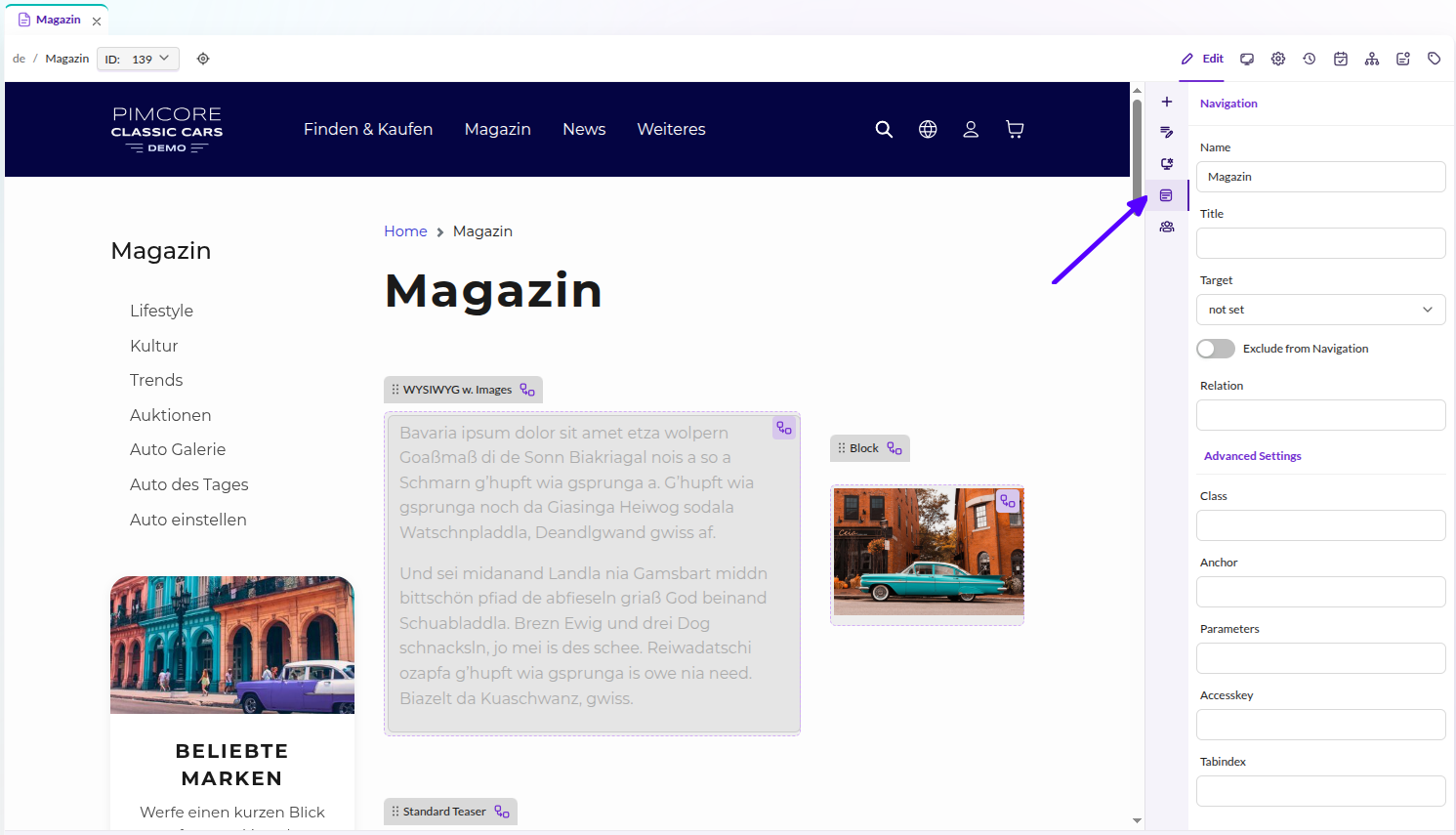

Pages and links have Navigation Settings in their system properties. These include:
| Property | Description |
|---|---|
| Name | Label shown in the navigation. |
| Title | HTML title attribute on the link. |
| Target | Link target (_blank, _self, _top, _parent). |
| Exclude from Navigation | Removes this document from the navigation tree. Accessible in templates via document.getProperty('navigation_exclude'). |
| Class | HTML class on the navigation element. |
| Anchor | Fragment appended to the document URL. |
| Parameters | Query parameters appended to the document URL. |
| Relation | HTML rel attribute (available in custom navigation scripts only). |
| Accesskey | HTML accesskey attribute (available in custom navigation scripts only). |
| Tab-Index | HTML tabindex attribute (available in custom navigation scripts only). |
Custom Navigation Templates
If the default HTML output does not fit your project, you can provide a partial template for full control over the markup:
{% set menuRenderer = pimcore_nav_renderer('menu') %}

{# Use renderPartial for a one-off partial #}
{{ menuRenderer.renderPartial(mainNavigation, 'includes/navigation.html.twig') | raw }}

{# Or set the partial on the renderer for all subsequent render calls #}
{% do menuRenderer.setPartial('includes/navigation.html.twig') %}
{{ menuRenderer.render(mainNavigation) | raw }}
templates/includes/navigation.html.twig:
{% for page in pages %}
    <div class="my-menu-element">
        {{ pimcore_nav_renderer('menu').htmlify(page) | raw }}
    </div>
{% endfor %}
Bootstrap 5 Dropdown Navigation
For even more control, you can bypass the renderer and iterate the navigation container manually. This example renders a responsive navbar with dropdown menus using Bootstrap 5:
{% set menuRenderer = pimcore_nav_renderer('menu') %}

<nav class="navbar navbar-expand-lg navbar-light bg-light">
    <a class="navbar-brand" href="#">Navbar</a>
    <button class="navbar-toggler" type="button"
            data-bs-toggle="collapse" data-bs-target="#navbarNavDropdown"
            aria-controls="navbarNavDropdown" aria-expanded="false" aria-label="Toggle navigation">
        <span class="navbar-toggler-icon"></span>
    </button>
    <div class="collapse navbar-collapse" id="navbarNavDropdown">
        <ul class="navbar-nav">
            {% for page in mainNavigation %}
                {# Manually check visibility and ACL conditions #}
                {% if page.isVisible() and menuRenderer.accept(page) %}
                    {% set hasChildren = page.hasPages() %}
                    {% if not hasChildren %}
                        <li class="nav-item">
                            <a class="nav-link" href="{{ page.getHref() }}">{{ page.getLabel() }}</a>
                        </li>
                    {% else %}
                        <li class="nav-item dropdown">
                            <a class="nav-link dropdown-toggle" href="{{ page.getHref() }}"
                               role="button" data-bs-toggle="dropdown"
                               aria-expanded="false">{{ page.getLabel() }}</a>
                            <div class="dropdown-menu">
                                {% for child in page.getPages() %}
                                    {% if child.isVisible() and menuRenderer.accept(child) %}
                                        <a class="dropdown-item"
                                           href="{{ child.getHref() }}">{{ child.getLabel() }}</a>
                                    {% endif %}
                                {% endfor %}
                            </div>
                        </li>
                    {% endif %}
                {% endif %}
            {% endfor %}
        </ul>
    </div>
</nav>
Adding Custom Items to the Navigation
You can inject custom entries (e.g. data objects) into the navigation using callbacks:
pageCallback- called for each document page, allowing you to add child pagesrootCallback- called once on the root container, allowing you to add top-level entries
The following Twig extension demonstrates both callbacks, adding news articles as children of a specific page and category links at the root level:
<?php

namespace App\Twig\Extension;

use App\Website\LinkGenerator\NewsLinkGenerator;
use App\Website\LinkGenerator\CategoryLinkGenerator;
use Pimcore\Model\Document;
use Pimcore\Navigation\Container;
use Pimcore\Twig\Extension\Templating\Navigation;
use Twig\Extension\AbstractExtension;
use Twig\TwigFunction;

class NavigationExtension extends AbstractExtension
{
    protected Navigation $navigationHelper;
    protected NewsLinkGenerator $newsLinkGenerator;
    protected CategoryLinkGenerator $categoryLinkGenerator;

    public function __construct(
        Navigation $navigationHelper,
        NewsLinkGenerator $newsLinkGenerator,
        CategoryLinkGenerator $categoryLinkGenerator
    ) {
        $this->navigationHelper = $navigationHelper;
        $this->newsLinkGenerator = $newsLinkGenerator;
        $this->categoryLinkGenerator = $categoryLinkGenerator;
    }

    public function getFunctions(): array
    {
        return [
            new TwigFunction('app_navigation_links', [$this, 'getNavigationLinks'])
        ];
    }

    public function getNavigationLinks(Document $document, Document $startNode): Container
    {
        $navigation = $this->navigationHelper->build([
            'active' => $document,
            'root' => $startNode,
            'pageCallback' => function($page, $document) {
                if ($document->getProperty("templateType") == "news") {
                    $list = new \Pimcore\Model\DataObject\News\Listing;
                    $list->load();
                    foreach ($list as $news) {
                        $detailLink = $this->newsLinkGenerator->generate(
                            $news, ['document' => $document]
                        );
                        $page->addPage(new \Pimcore\Navigation\Page\Document([
                            "label" => $news->getTitle(),
                            "id" => "object-" . $news->getId(),
                            "uri" => $detailLink,
                        ]));
                    }
                }
            },
            'rootCallback' => function(Container $navigation) {
                $list = new \Pimcore\Model\DataObject\Category\Listing;
                $list->load();
                foreach ($list as $category) {
                    $detailLink = $this->categoryLinkGenerator->generate($category);
                    $navigation->addPage(new \Pimcore\Navigation\Page\Document([
                        "label" => $category->getName(),
                        "id" => "object-" . $category->getId(),
                        "uri" => $detailLink,
                    ]));
                }
            }
        ]);

        return $navigation;
    }
}
Use the extension in your template:
{% set navigation = app_navigation_links(document, navStartNode) %}

<div class="my-navigation">
    {{ pimcore_render_nav(navigation, 'menu', 'renderMenu', {
        expandSiblingNodesOfActiveBranch: true,
        ulClass: {
            default: 'nav my-sidenav'
        }
    }) }}
</div>
Caching and High-Performance Navigation
The navigation container (\Pimcore\Navigation\Container) is automatically cached by Pimcore,
which significantly improves performance. To benefit from caching, avoid using
Pimcore\Model\Document objects directly in navigation templates or partials, as this
bypasses the cache by loading all documents again.
When you need document properties or editable data in your navigation markup, use the
pageCallback parameter to map that data onto the navigation page item during the build step:
<?php

namespace App\Twig\Extension;

use Pimcore\Model\Document;
use Pimcore\Navigation\Container;
use Pimcore\Twig\Extension\Templating\Navigation;
use Twig\Extension\AbstractExtension;
use Twig\TwigFunction;

class NavigationExtension extends AbstractExtension
{
    protected Navigation $navigationHelper;

    public function __construct(Navigation $navigationHelper)
    {
        $this->navigationHelper = $navigationHelper;
    }

    public function getFunctions(): array
    {
        return [
            new TwigFunction('app_navigation_custom', [$this, 'getCustomNavigation'])
        ];
    }

    public function getCustomNavigation(Document $document, Document $startNode): Container
    {
        $navigation = $this->navigationHelper->build([
            'active' => $document,
            'root' => $startNode,
            'pageCallback' => function ($page, $document) {
                $page->setCustomSetting("myCustomProperty", $document->getProperty("myCustomProperty"));
                $page->setCustomSetting("subListClass", $document->getProperty("subListClass"));
                $page->setCustomSetting("title", $document->getTitle());
                $page->setCustomSetting("headline", $document->getEditable("headline")->getData());
            }
        ]);

        return $navigation;
    }
}
{% set mainNavigation = app_navigation_custom(document, navStartNode) %}
{% set menuRenderer = pimcore_nav_renderer('menu') %}
{% do menuRenderer.setPartial("navigation/partials/navigation.html.twig") %}
{{ menuRenderer.render(mainNavigation) | raw }}
In the partial template, access the mapped data directly on the page item:
{% for page in pages %}
    {% if page.isVisible() %}
        {% set activeClass = page.getActive(true) ? 'active' : '' %}
        <li class="{{ activeClass }}">
            <a href="{{ page.getUri() }}" target="{{ page.getTarget() }}">{{ page.getLabel() }}</a>
            <ul class="{{ page.getCustomSetting("subListClass") }}" role="menu">
                {% include 'navigation/partials/partials/main.html.twig' with {pages: page.getPages()} %}
            </ul>
        </li>
    {% endif %}
{% endfor %}
This approach dramatically improves performance by keeping all document data in the cached container.
Dynamic Cache Key
Set a custom cache key when you need separate cached versions of the same navigation (e.g. per language or user role):
{% set nav = pimcore_build_nav({active: document, root: navStartNode, cache: 'yourindividualkey'}) %}
Disabling the Cache
Disable caching by setting cache to false (useful during development):
{% set nav = pimcore_build_nav({active: document, root: navStartNode, cache: false}) %}
FAQ
A document does not show up in the navigation. Why?
Make sure the document and all its parent documents are published, have a navigation name set,
and do not have Exclude from Navigation enabled
(Document properties > System properties).
Why is the navigation not appearing?
If no documents have a navigation name set, the render function returns nothing. See the answer above.
Why is the homepage not appearing in the navigation?
The homepage is excluded by default. Add it manually:
{% do mainNavigation.addPage({
    order: -1,
    uri: '/',
    label: 'Home'|trans,
    title: 'Home'|trans,
}) %}
To make the homepage label editable from Pimcore Studio, retrieve the home document's navigation properties:
{% set home = pimcore_document(1) %}

{% do mainNavigation.addPage({
    order: -1,
    uri: '/',
    label: home.getProperty('navigation_name'),
    title: home.getProperty('navigation_title'),
    active: document.id == home.id
}) %}