Authentication
The agent-server does not own users. Every /agent-server/api/* endpoint (except two explicit exceptions) inherits
authentication from Pimcore itself: the browser sends the user's Pimcore session cookie, the agent-server validates
it against the PHP backend, and MCP tool calls run with the user's real permissions. Admin endpoints use a separate bearer token.
For a map of every communication flow and the credential each one uses, start at Communication Flows. This page is the credential reference behind that map.
The auth credentials
| Credential | Used by | Value | Endpoint reached |
|---|---|---|---|
| User session cookie | Browser → agent-server; agent-server → auth-validator + synchronous bundle-API persistence | Pimcore PHPSESSID cookie | /agent-server/api/* (excluding admin); GET /pimcore-studio/api/user/current-user-information; POST …/bundle/agent/sessions|proposals (synchronous work) |
| MCP access token (per chat session) | Agent-server → internal MCP tools (always) and deferred bundle-API persistence | Authorization: Bearer pmcp_… | /pimcore-mcp/agent/* (MCP firewall); /pimcore-studio/api/bundle/agent/sessions|proposals (bundle-API firewall) |
| Admin bearer token | Agent-server → PHP config export; operator → admin endpoints | AGENT_SERVER_ADMIN_TOKEN | GET /pimcore-studio/api/bundle/agent/configurations/export, /agent-server/api/admin/* |
| Mercure publisher JWT | Agent-server → Mercure hub (publish only) | HS256, shared MERCURE_JWT_KEY | MERCURE_SERVER_URL (per-user topic) |
Each credential is detailed below. See MCP Integration → Authentication forwarding for the full token lifecycle (issue / refresh / re-mint / revoke / GC).
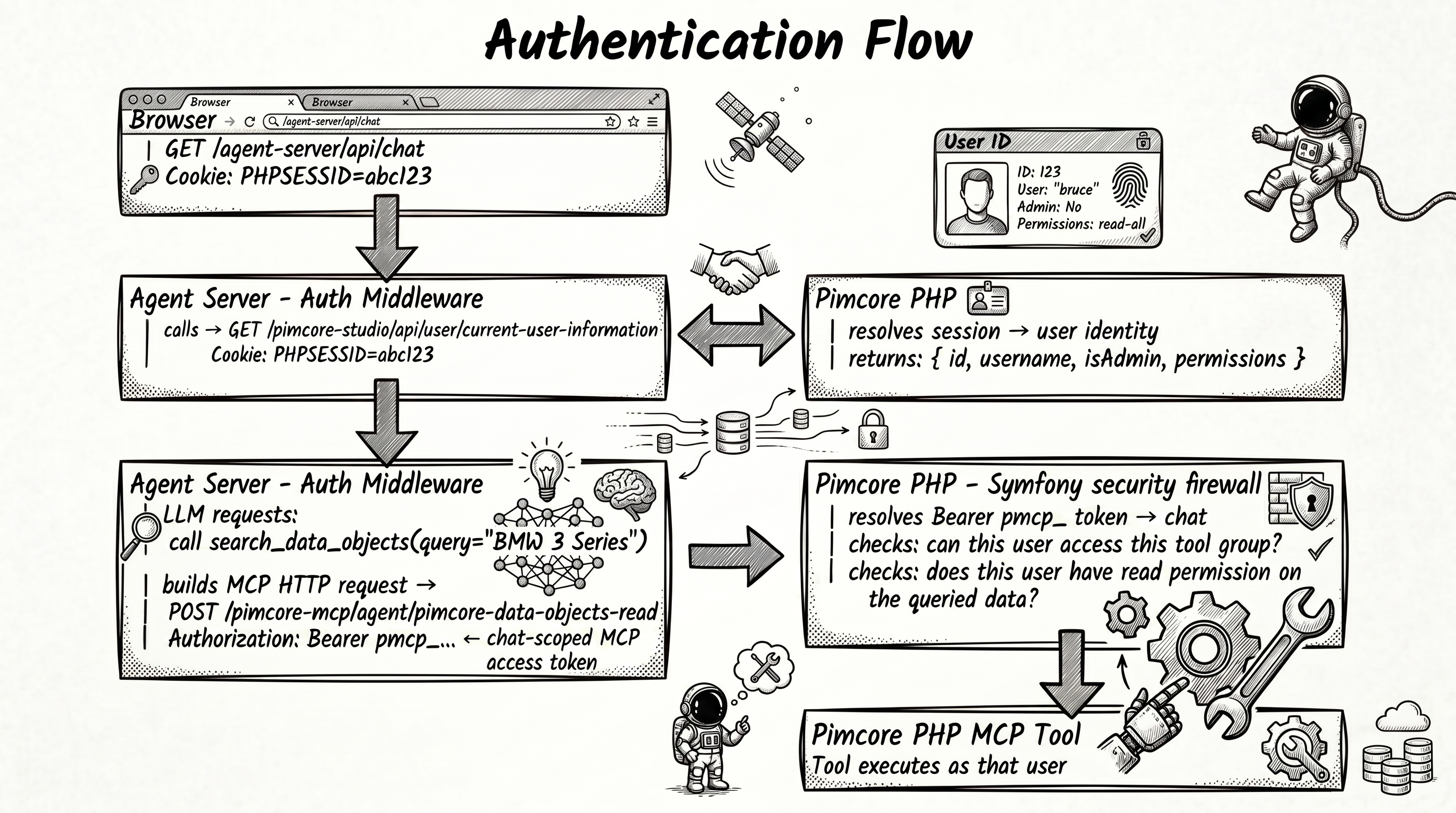

User session cookie
Flow
- Browser includes the Pimcore session cookie on every request.
- Nginx proxies to the agent-server, forwarding the cookie.
- Auth middleware calls
GET /pimcore-studio/api/user/current-user-informationwith the cookie. - PHP resolves the session to a Pimcore user and returns identity (ID, username, admin flag, permissions).
- The identity is cached so repeat requests don't re-hit PHP.
Identity cache
The validated identity is cached in-memory keyed by sha256(cookie). TTL defaults to 60 seconds
(AGENT_SERVER_AUTH_CACHE_TTL). After expiry the next request re-validates against PHP.
This is the validation cache only. Conversation data lives in Session Storage.
Server-to-server calls: bundle API and internal MCP
The browser cookie authenticates the agent-server's own /agent-server/api/* endpoints (via the
auth-validator call GET /pimcore-studio/api/user/current-user-information). For calls the agent-server
makes into PHP on behalf of a chat session, the credential depends on the target:
- Internal MCP servers (
/pimcore-mcp/agent/*) - always the chat-scoped bearer (Authorization: Bearer pmcp_…), resolved byMcpAccessTokenAuthenticatoron thepimcore_mcpfirewall from Studio Backend. - Bundle API (
/pimcore-studio/api/bundle/agent/sessions|proposals) - the validated session cookie for synchronous in-request work, and thepmcp_…bearer for deferred work that must outlive the browser session (e.g. the post-turn persistence flush). Both are accepted by the dedicatedpimcore_agent_bundle_apifirewall, whose authenticator chain isSessionBridge → McpAccessTokenAuthenticator. PAT is intentionally excluded - a personal access token is the external-client credential, and an external PAT user has no chat session to act on. The firewall pattern is^/pimcore-studio/api/bundle/agent/(sessions|proposals); other bundle/agent routes (/configurations/*,/skills/*,/templates/*) stay on the broaderpimcore_studiofirewall.
The firewall definitions are exposed as container parameters (%pimcore_agent.bundle_api_firewall_settings%,
%pimcore_studio_backend.mcp_firewall_settings%) and wired in the project's security.yaml - see
Installation → Configure Security for the YAML.
However the credential arrives, McpAccessTokenAuthenticator (bearer) or SessionBridgeAuthenticator (cookie)
resolves it to the session's effective Pimcore User, and Pimcore's standard permission system applies. By default
the effective user is the chat initiator, so an agent has exactly the permissions of the user who started the
chat - no privilege escalation, no service-account fallback. The one deliberate exception is an agent configured
with an executionUser: see Execution user resolution below.
External MCP servers (mcpServers) receive neither the cookie nor the MCP access token; they use whatever auth
their YAML configures. For the issue / refresh / re-mint / revoke / GC lifecycle of the bearer see
MCP Integration → Token lifecycle.
Exceptions
These endpoints do not require a cookie:
GET /agent-server/api/health- health check.GET /agent-server/api/docs- Swagger UI (only whenNODE_ENV≠production).
Execution user resolution
Agent configurations can optionally carry an executionUser field - a Pimcore username the whole session should
act as instead of the chat initiator. Full field reference:
Configuration → Agents → Execution user.
Where resolution happens
EffectiveUserResolver runs once, at session creation, when the first MCP access token for a chat session is
minted. It receives the chat session id, the agent name, and the initiator's user id:
- When the agent's
executionUseris empty (the default), the effective user is the initiator, exactly as described above. - When
executionUseris set, the configured username is looked up against active Pimcore users. If it resolves, the effective user becomes that user's id. If it does not resolve to an active user, resolution fails and session creation fails with it - a configured but broken execution user never falls back to the initiator silently.
The MCP access token is then minted for the resolved effective user id, not necessarily the initiator's. Because internal MCP tools already derive their acting user from the token, as described above, this single resolution point is enough to make every tool call, MCP call, and permission check in the session run with the execution user's permissions.
Session ownership is unaffected
Effective-user resolution only changes who the MCP token acts as; it does not change who owns the chat. Session
ownership checks (listing, resume, history) are always evaluated against the initiator's user id, independently of
executionUser. A user who starts a chat with an execution-user agent still sees that session in their own session
list and remains the only one who can resume it.
See Tool Security → Execution user and information disclosure for the security implications of running a session as a more privileged user than the initiator.
Per-provider LLM authentication
Each inference provider in pimcore_agent.inference.providers carries its own auth_mode and token. The
agent-server applies provider auth at session-creation time - after resolving which provider an agent uses -
before the SDK session is started:
auth_mode | Effect |
|---|---|
byok | Builds an SDK provider block: { type, baseUrl, apiKey }. The token value (after ${VAR} interpolation) becomes the apiKey. |
github | Sets the session-level gitHubToken. No provider block is added. |
A session's provider credentials are determined once at creation and held for the lifetime of the SDK session. If the agent changes mid-conversation (agent switch) the SDK session is recreated with the new agent's provider resolved from scratch.
Mixing byok and github agents in the same deployment is supported - each agent's session uses its own provider's credentials independently. The single caveat is that only one GitHub identity (GitHub PAT) is used across all github-mode providers in a deployment; multiple distinct GitHub accounts per provider are not yet supported.
For the full schema and examples of provider configuration, see Inference Providers.
Admin bearer token
Admin endpoints are machine-to-machine: the agent-server fetches the config export endpoint in PHP, and an operator may trigger a reload or list models.
AGENT_SERVER_ADMIN_TOKEN=<strong-random-value>
If AGENT_SERVER_ADMIN_TOKEN is unset, admin endpoints return 403. In production use a strong random value.
Endpoints
| Endpoint | Used by |
|---|---|
GET /pimcore-studio/api/bundle/agent/configurations/export | The agent-server, on startup and on every reload. Verified with hash_equals; bypasses the user-session firewall via a PUBLIC_ACCESS rule in security.yaml. |
POST /agent-server/api/admin/reload-agents | Re-fetches the config export, clears sessions, returns model-validation warnings. |
GET /agent-server/api/admin/models | Lists available LLM models, cross-references them against agent configs. |
The config-export flow (three-layer merge, push-on-CRUD reload, background retry) is documented in Configuration System → Export endpoint contract.
Example:
curl -X POST http://localhost/agent-server/api/admin/reload-agents \
  -H "Authorization: Bearer $AGENT_SERVER_ADMIN_TOKEN"
Mercure publisher JWT
Live cross-client chat sync publishes each turn event to Studio's per-user Mercure topic using a narrow
publisher JWT - HS256, signed in-process with the shared MERCURE_JWT_KEY, scoped to
studio-backend-default/user/{id}. This credential only publishes to the hub; it never authenticates a user.
Because each publish is a Mercure private update, the hub delivers it only to that user's own tabs/devices,
so cross-tenant isolation is enforced by the hub, not by agent-server code. The MERCURE_JWT_KEY lives in the
agent-server env at the same trust level as PHP and is never shipped to the browser. If it is unset/blank the
publisher is a no-op (startup warning) - replies stop streaming and surface only on the client's record
re-read; PHP remains the record. See Real-time Sync.
Full detail - topic, private-update targeting, subscriber auth, coalescing - is in
Real-time Sync → Live delivery.
The MERCURE_JWT_KEY / MERCURE_SERVER_URL values are in
Configuration → Environment Variables.
CSRF protection
Every state-changing request (POST / PUT / DELETE) to /agent-server/api/* must include X-Requested-With: XMLHttpRequest.
This triggers the CORS preflight for cross-origin requests and blocks silent cross-site form submissions.
The frontend sets the header automatically in both the streaming fetch client (agent-stream.service.ts) and the
RTK Query slice (agent-api-slice.ts). If you add a new endpoint or call from custom code, include the header:
fetch('/agent-server/api/…', {
  method: 'POST',
  headers: {
    'Content-Type': 'application/json',
    'X-Requested-With': 'XMLHttpRequest'
  },
  credentials: 'include',
  body: JSON.stringify(payload)
})
Rate limiting
Per-user limits via @fastify/rate-limit, keyed by authenticated user ID (falling back to IP):
| Endpoint group | Limit |
|---|---|
Chat (POST /chat, POST /chat/:id) | 20 / min |
Sessions (GET /sessions) | 30 / min |
Admin (POST /admin/*) | 5 / min |
Over the limit → HTTP 429.
Other security measures
-
Credential isolation - internal MCP tool calls and deferred bundle-API persistence use the chat-scoped
pmcp_…bearer; synchronous bundle-API persistence reuses the validated session cookie; the cookie is never forwarded to MCP servers. Third-party servers undermcpServersreceive only what their YAML defines. The chat session id is bound to the bearer server-side and recovered from the validated token, not from any client-supplied header. -
Error sanitisation - internal error details (stack traces, SDK errors, upstream URLs) never reach the client. SSE
errorevents carry generic messages; full details are server-side logs. -
Message length cap - chat messages are capped at 10,000 characters to prevent token-cost abuse and storage exhaustion.
-
Request IDs - every response returns
X-Request-Id. Nginx-supplied IDs are preserved; otherwise a UUID is generated. -
Host validation / DNS rebinding - the internal MCP endpoints (
/pimcore-mcp/agent/*) are reachable through nginx by external agents, so theHostheader must be constrained. This is handled by Pimcore'sTRUSTED_HOSTSenvironment variable (a regex; Pimcore'sBootstrappasses it toRequest::setTrustedHosts()), which Symfony enforces inkernel.request- a non-matchingHostis rejected with400before any controller runs. That is what defeats DNS rebinding, where an attacker re-points their own domain at the server and the request arrives with the attacker'sHost.TRUSTED_HOSTSis unset by default - set it in production.The PHP MCP SDK ships its own
DnsRebindingProtectionMiddleware, but it matchesHost/Originliterally against{localhost, 127.0.0.1, [::1]}and cannot consume Symfony's regextrusted_hosts, so it would reject every request in a reverse-proxied deployment. The MCP transport therefore receives an explicit middleware stack ofCorsMiddlewareandProtocolVersionMiddleware- the SDK's default stack minus the DNS-rebinding check - and relies on the framework-level check above forHostvalidation. Note this is distinct fromTRUSTED_PROXIES(which Pimcore does set), which governs client IP/scheme resolution fromX-Forwarded-*, notHostvalidation.
Audit log
Security events are emitted as structured JSON with "level": "audit":
| Event | When |
|---|---|
auth_no_cookie | Non-exception endpoint hit without a cookie. |
auth_failed | Cookie validation against Pimcore returned no user. |
session_access_denied | User tried to access another user's session. |
admin_no_token_configured | Admin endpoint hit while AGENT_SERVER_ADMIN_TOKEN is unset (returns 403). |
admin_auth_missing / admin_auth_failed | Admin endpoint hit without / with wrong token. |
admin_reload_agents / admin_list_models | Successful admin actions. |
The tool-security hook adds its own audit records - see Tool Security.