How to Use the Widget Manager
Overview
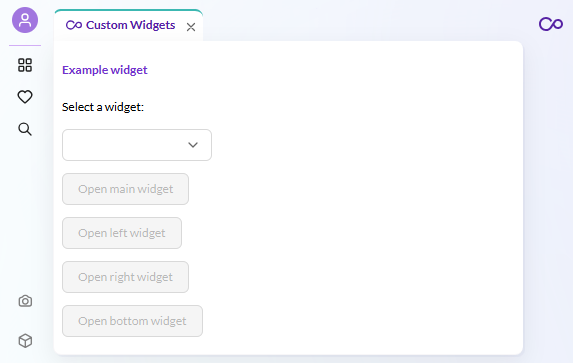
This example registers a custom widget component and opens it programmatically in different panel areas of Pimcore Studio.
Pimcore Studio has two widget systems that work together:
-
Widget Manager (
WidgetRegistry+useWidgetManager) - registers React components by name and opens them as panels in main/left/right/bottom areas. This is the rendering system. -
Widget Editor (
DynamicTypeWidgetTypeAbstract+DynamicTypeWidgetTypeRegistry) - registers widget type definitions for the perspective editor. This is how the perspective editor discovers widget types, shows them in the "add widget" dropdown, and renders configuration forms.
The Widget Editor tells the perspective editor what widget types exist and how to configure them, while the Widget Manager renders the actual widget component at runtime.
Screenshot

Details
Widget Manager
Register a widget component in a module via the WidgetRegistry, then open it with the
useWidgetManager hook. The hook provides methods for each panel area:
openMainWidget(), openLeftWidget(), openRightWidget(), openBottomWidget().
Widget Editor Integration
To make a custom widget type available in the perspective editor,
register a DynamicTypeWidgetTypeAbstract subclass:
id- must match the backend widget type string registered inpimcore_studio_backend.widget_typesname- display name in the dropdowngroup- groups related widget typesicon- icon name from the Pimcore icon libraryform()- returns the configuration form for the perspective editor
Bind the class in your plugin's onInit, then register it in the
DynamicTypeWidgetTypeRegistry via a module.
Key Mapping
The widget type string must match between:
- Backend
pimcore_studio_backend.widget_typesconfig - Backend
WidgetConfigRepositoryInterface.getSupportedWidgetType() - Backend
WidgetConfigHydratorInterface.getSupportedWidgetType() - Frontend
DynamicTypeWidgetTypeAbstract.id
Code Example on GitHub
Related
- Extending Widgets (Backend) - widget type registration, repository, hydrator, schema
- Custom Perspective Widgets - cross-layer guide