Working With Sites
Introduction
With Sites, it is possible to create multi domain web applications within Pimcore. Starting point is always a certain node in the Documents tree. From this starting point on, the whole sub tree can appear as an own Site and is reachable with a certain domain.
Configuring Sites
You can create subsites in Pimcore very easily directly in the context menu of the Document tree:
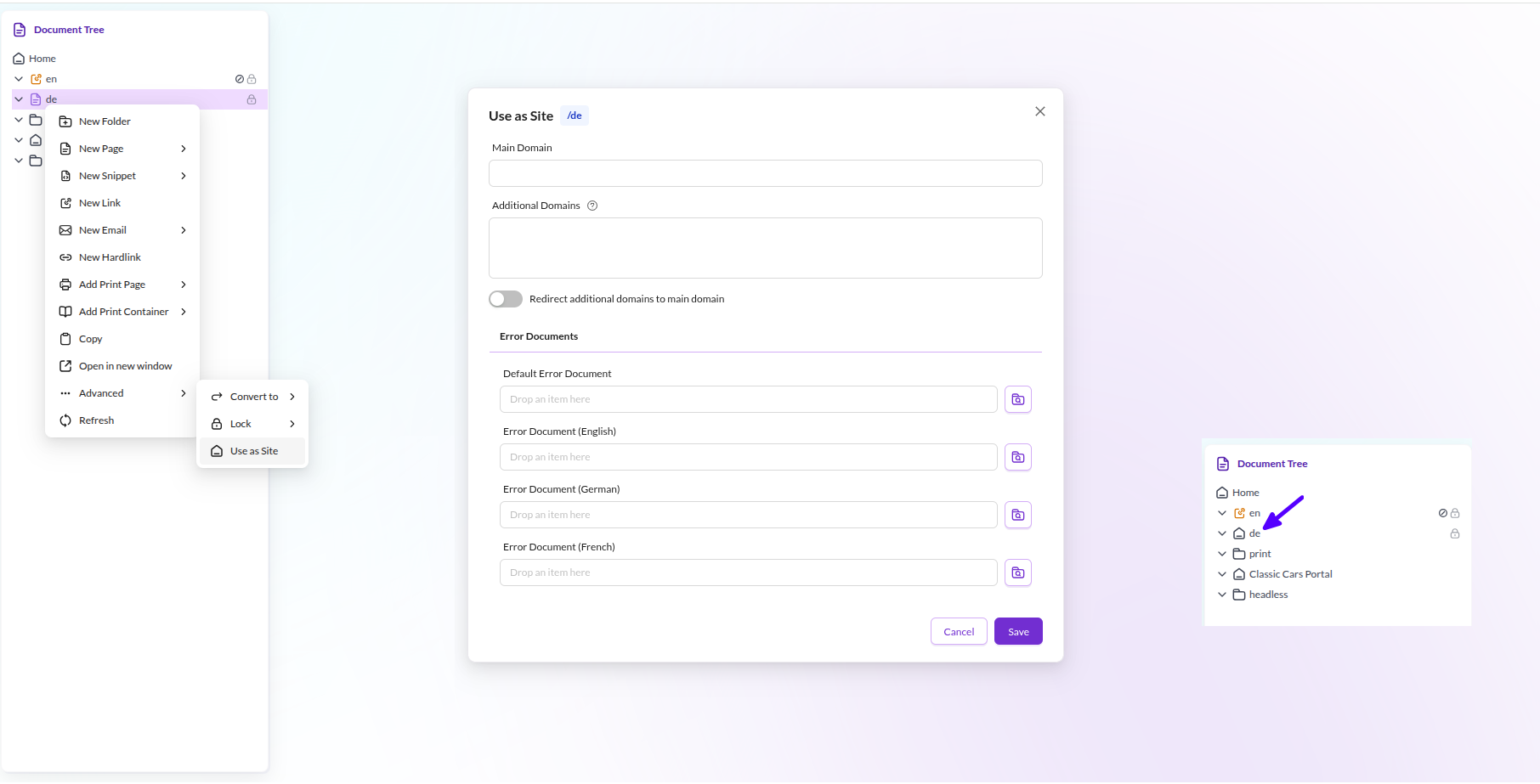

Your server setup (VHost, ServerAlias) must be configured so that requests for all
domains are delegated to Pimcore.
Routing functionalities like Redirects support site-specific configuration. Also, lots of other Pimcore tools and functionalities like Tag & Snippet Management, Marketing Settings (Google Analytics, Google Search Console, Google Tag Manager) and Website Settings are site specific.
Sites in your Code
Check if Current Request is Inside a Subsite
if(\Pimcore\Model\Site::isSiteRequest()) { /* ... */ }
{% if pimcore_site_is_request() %}
    {# ... #}
{% endif %}
Working with the Navigation Helper
See Navigation for more information.
Getting the full path of a document inside a subsite-request
$document->getRealFullpath(); // returns the path including the site-root
$document->getFullPath(); // returns the path relative to the site-root
document.getRealFullpath()   {# returns the path including the site-root #}
document.getFullPath()  {# returns the path relative to the site-root #}
Getting the root-document of the current site
if (\Pimcore\Model\Site::isSiteRequest()) {
    $site = \Pimcore\Model\Site::getCurrentSite();
    $navStartNode = $site->getRootDocument();
} else {
    $navStartNode = \Pimcore\Model\Document::getById(1);
}
    {% if pimcore_site_is_request() %}
        {% set site = pimcore_site_current() %}
        {% set navStartNode = site.getRootDocument() %}
    {% else %}
        {% set navStartNode = pimcore_document(1) %}
    {% endif %}
Site Utility Methods
\Pimcore\Tool\Frontend::getSiteForDocument($document);
\Pimcore\Tool\Frontend::isDocumentInCurrentSite($document);
\Pimcore\Tool\Frontend::isDocumentInSite($site, $document);
Document Preview Navigation with Sites
Please keep in mind that when previewing documents that have links to different Sites, the navigation may not be working properly due the Iframe Content Security Policies and Cross-origin resource sharing (CORS) policy, please set your own security rules accordingly to your own needs.