Configuration
Open System → Duplicates Configuration in Pimcore Studio. The screen is admin-only and has two tabs, General and Scope.
Three buttons separate saving from running:
| Button | Effect |
|---|---|
| Save | Persists the configuration. No run is started. |
| Save & Detect | Persists, then starts an incremental run after a confirmation. Refused before anything is queued if it would break the lowered-floor rule, see Stored vs shown. |
| Save & Full Detection | Persists, then starts a full run. Confirmed with a destructive-style prompt, because this is also the step that lets stale findings be withdrawn. |
Only one run per scope is allowed at a time. The status line above the tabs reports the last run, and a banner tracks a running one, see Runs and Progress.
General tab
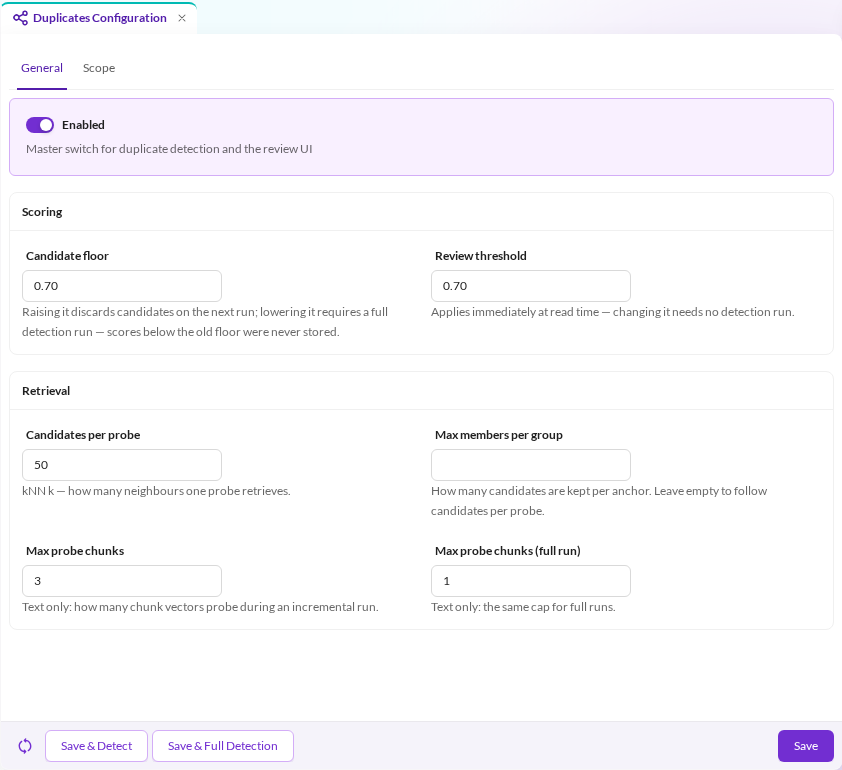
How strict detection is, and how hard it looks.

| Field | Default | Description |
|---|---|---|
| Enabled | off | Master switch for detection and the review screens. Switch it on and enable at least one scope. |
| Candidate floor | 0.70 | Minimum score stored. Raising it discards candidates on the next run; lowering it requires a full run. |
| Review threshold | 0.70 | Minimum score shown, applied at read time to the group's top score and each member's score. Changing it needs no run. It defaults to the candidate floor — show everything stored — because measured near-duplicate findings cluster below 0.85 and a higher default would hide the whole near-duplicate tier. Raise it to quieten the queue once you know your data. |
| Candidates per probe | 50 | The kNN k: how many neighbours one probe retrieves. |
| Max members per group | empty | How many candidates are kept per reference. Empty follows candidates per probe. Below that, retrieval is wasted; above it, the cap is decorative for a single-probe image field. Raising it past k means raising k too, which costs detection time. |
| Max probe chunks | 3 | Text only. How many of an element's chunk vectors probe during an incremental run. Cost multiplies by this. |
| Max probe chunks (full run) | 1 | The same cap for full runs, deliberately lower because a full pass pays it once per element across the whole scope. |
Scope tab
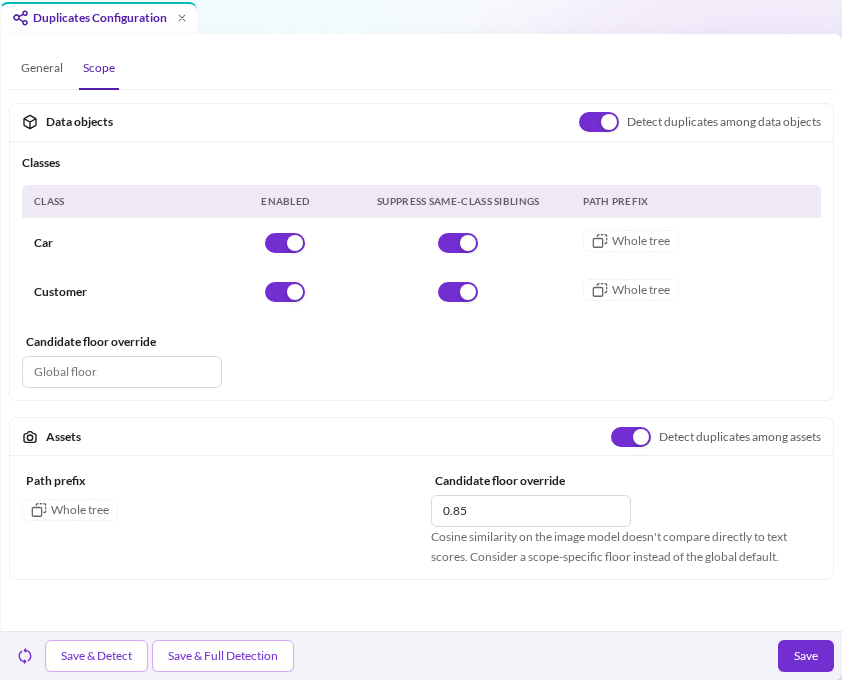
What is looked at.

Data objects
Detect duplicates among data objects switches the scope on, then each class is configured in its own row. Detection is opt-in per class: naming a class makes it eligible, its own Enabled toggle makes it run.
| Column | Default | Description |
|---|---|---|
| Enabled | off | Detect duplicates for this class. |
| Suppress same-class siblings | on | Suppress a same-class sibling, or anything in its subtree, that shares a data object parent with the reference. On for variant-shaped classes; off for classes where same-folder matches are exactly the point, see Structural filters. |
| Folders | whole tree | Include and exclude folders for this class, see Folder rules. |
The selectable classes are those configured under embeddings; a class embeddings does not cover is rejected on save.
Assets
Detect duplicates among assets covers images only. Folders restrict it, see Folder rules.
Folder rules
Each rule names a folder and either includes or excludes it together with its subtree. As with workspaces, the deepest rule covering an element decides, so an included tree can exclude its inbox folder and re-include a folder below that. Without an include rule, everything outside the excluded folders is in scope; without any rule, the whole tree is.
- Rules apply to references and members in both tiers: a group never contains an element outside them. Fuzzy detection applies them inside the kNN request, before candidates are counted.
- A folder covers itself and its subtree:
/Productsdoes not cover/Products-Old. Paths compare case-sensitively in detection and withdrawal alike, so a YAML rule must spell the folder exactly as it is stored. - Narrowing the rules needs no full run: the next run withdraws groups whose reference is outside them and removes outside members from the rest; a group left with its reference alone is withdrawn. Widening them needs a full run, as elements outside the old rules were never analysed.
pimcore_backend_power_tools:
    duplicates:
        assets:
            paths:
                - { path: /Product Images }
                - { path: /Product Images/Inbox, mode: exclude }
        objects:
            classes:
                Car:
                    enabled: true
                    paths:
                        - { path: /Test Data, mode: exclude }
path_prefix is deprecated since 2026.3.2 and will be removed in the next major release. It is read
as a single include rule; a stored configuration is rewritten to paths on its next save.
Candidate floor override
Both scopes can override the global candidate floor. Text and image scores live on different scales — cosine similarity on the image model does not compare directly to MinHash scores — so one floor rarely fits both; the editor says so next to the asset field. Lowering an override requires a full run, like the global one.
Choosing the embedding model (usage)
There is no editor field for this, on either scope. Left unset, detection always uses the
canonical dedup usage for the modality — object_dedup for data objects, image_dedup for assets.
That choice is deterministic: it never scans for another usage of the same modality, so a second
same-modality model cannot make detection ambiguous, and a run is blocked with an error if the
canonical usage is not configured under embeddings.usages.
usage is therefore an explicit override, needed when you want detection to use a usage other than
the canonical one. It must name a registered usage of the matching modality:
pimcore_backend_power_tools:
    duplicates:
        objects:
            usage: my_other_text_usage
Coupling to the embeddings configuration
The duplicates configuration is not self-contained: it takes its classes and its model from the embeddings configuration, so a change there ripples through in two ways.
A class removed from the embeddings scope. On read it is stripped out of the duplicates classes and a warning is logged; a save that still names it is rejected. Detection stops using it immediately, and its existing groups are withdrawn on the next run.
Removing image from the embedded asset types, or disabling embeddings entirely. The asset scope
is paused rather than broken: the read path forces its enabled to false, and a save that tries
to enable an unavailable scope is rejected.
Withdrawal is destructive, not a pause — the groups are deleted, not hidden. Re-enabling the class or the embeddings switch only makes the scope eligible again; rebuilding its groups needs a full run, and the declined/restored decisions on the withdrawn groups do not carry over.
Where the configuration is stored
Like the embeddings configuration, this is a Pimcore location-aware configuration.
pimcore_backend_power_tools:
    config_location:
        duplicates:
            write_target:
                type: settings-store          # default; also: symfony-config, disabled
            read_target:
                type: ~                       # default; also: settings-store, symfony-config
| Setup | Behaviour |
|---|---|
| Defaults, as shipped | Reads container config first, settings store as fallback — a hand-written pimcore_backend_power_tools.duplicates YAML node therefore takes over and the editor turns read-only. Saves go to the settings store. |
write_target.type: symfony-config | Saves write YAML into var/config/backend_power_tools_duplicates/, loaded back into the container config. Writing is only permitted in debug mode, so production editors are read-only. |
write_target.type: disabled | The editor is read-only everywhere; the configuration is deploy-managed. |
read_target.type: settings-store | Reads come only from the settings store; a YAML duplicates node is ignored entirely. |
read_target.type: symfony-config | Reads come only from YAML; the settings store is ignored. |
Pointing read_target and write_target at different locations makes the editor write where reads
never look, and saves appear to vanish. Pick a matching pair unless you know exactly why not.
Deploy-time: duplicates_execution
How hard a run is allowed to push is never stored or editable in Studio — these are cluster operations knobs, not content configuration:
pimcore_backend_power_tools:
    duplicates_execution:
        budget:
            max_elements_per_run: 0     # 0 = unlimited
            max_runtime_seconds: 0      # 0 = unlimited
        cluster_courtesy:
            throttle_ms: 0              # pause between index requests
            request_timeout_ms: 30000   # per-request timeout on the search engine
        stale_worker_threshold_seconds: 1800   # 0 = disabled
| Option | Default | Description |
|---|---|---|
budget.max_elements_per_run | 0 (unlimited) | Caps how many elements one fuzzy sweep invocation (the fuzzy tier of one scope, or one fuzzy recovery retry) processes before stopping at its checkpoint. Not a whole-job limit. The exact tier is not counted and not limited by it. |
budget.max_runtime_seconds | 0 (unlimited) | Caps how long one sweep invocation (one tier of one scope, or one recovery retry) may take before it stops at its checkpoint. Not a whole-job limit. |
cluster_courtesy.throttle_ms | 0 | Pause between index requests. Detection shares the search thread pool with Studio search and production kNN queries, so a busy cluster may need headroom; raising this trades run duration for it. |
cluster_courtesy.request_timeout_ms | 30000 | Per-request timeout on the search engine, for exact-tier aggregation pages, fuzzy anchor reads and fuzzy probes, so one pathological query cannot hold a search thread indefinitely. A request that hits the timeout, or comes back with a failed shard, fails the sweep step: its results are partial, so the run ends finished with errors rather than checkpointing past what it missed. |
stale_worker_threshold_seconds | 1800 | How long a running analysis job may go without activity before the analysis status flags staleWorkerSuspected, so a dead worker is shown instead of hidden. Activity is the newer of the job run's last update and the latest page checkpoint any sweep wrote, so a long sweep that keeps checkpointing is not flagged. 0 = disabled. |
Both budgets stop a sweep at its checkpoint, never mid-page, so nothing past the checkpoint is recorded as done. The runtime budget applies to both tiers; the element budget applies to the fuzzy tier only. Both are measured per sweep invocation, not per job: the exact and fuzzy sweep of each scope, and each recovery retry, start their own timer, and every fuzzy sweep its own element count.
A job run keeps a single, tier-tagged resume cursor, and the exact tier runs before the fuzzy tier. A retry within the same job run therefore only resumes from a checkpoint of its own tier: once the fuzzy tier has checkpointed, a retry of a failed exact sweep starts that sweep from the beginning.
A budget cutoff is not a way to spread one pass over several maintenance windows. The resume cursor
is stored per job run, and a new invocation — CLI, cron or Studio — creates a new one, so it starts
the sweep from the beginning. A budget small enough to cut a full pass short will keep re-scanning
the same first elements, never reaching the rest. Size every budget you enable so each sweep can
finish: max_runtime_seconds for the longest sweep of either tier, and max_elements_per_run for the
largest scope the fuzzy tier sweeps.
Defaults reference
The seeded configuration leaves most options unset; these are the effective defaults the configuration tree fills in on read.
| Option | Effective default |
|---|---|
enabled | false |
candidate_floor | 0.70 |
review_threshold | 0.70 |
candidates_per_probe | 50 |
max_probe_chunks | 3 |
max_probe_chunks_full | 1 |
max_members_per_group | ~ → follows candidates_per_probe |
objects.classes | {} → no class detected until named and enabled |
objects.classes.*.enabled | false |
objects.classes.*.suppress_same_class_siblings | true |
objects.classes.*.paths | [] (whole tree) |
objects.usage / assets.usage | ~ → canonical object_dedup / image_dedup usage |
objects.candidate_floor / assets.candidate_floor | ~ → the global candidate_floor |
assets.paths | [] (whole tree) |