Activities
Customer activities are a key part of CMF. An activity can be almost anything a customer does, from something as simple as a login to something as complex as an order or a booking. Use CMF to store customer-related activity data and reuse it, for example for segment building or as information for the customer service team.
CMF stores activities together in a generic JSON store called the ActivityStore, backed by default by a MariaDB table
(plugin_cmf_activities).
Using Pimcore Data Objects and Other Data Entities as Activities
Besides the generic activity store, you can also use Pimcore data objects (or other data entities and sources) as
activities. They only need to implement
ActivityInterface
(Pimcore data objects extend
AbstractObjectActivity).
These activities keep their own data persistence, but CMF also stores them in the generic ActivityStore, which saves every activity in a standardized way and represents a full history of customer activities.
For example, if an order is later cancelled, the cancellation can become a new activity in the ActivityStore, giving you both the original order activity and a separate cancellation activity. Whether you need that level of detail depends on your use case. You can also delete or update the original activity in the ActivityStore if necessary.
Generic Activities
As mentioned above, activities can use their own persistence in addition to the ActivityStore, but they do not have
to. You can also save activities only in the ActivityStore. The framework includes a generic activity implementation
for this case:
CustomerManagementFrameworkBundle\Model\Activity\GenericActivity.
The REST API uses this activity as the default when no implementationClass is specified. It
handles a nested, associative array of data that is stored only in the ActivityStore.
That said, GenericActivity is not the only option for activities without their own persistence. Implementing a
dedicated activity class, for example to track logins, is often worthwhile. See implementations like
MailchimpStatusChangeActivity
or
TrackedUrlActivity
for reference.
ActivityStore
The ActivityStore saves and reads activity data to and from the database. By default, it uses a MariaDB implementation. Activity attributes only need to form a valid JSON object; there is no limit on the number of attributes or their nesting depth. The MariaDB implementation stores the table using dynamic columns, which allows SQL queries against the attribute fields even though they are all stored together in a blob field. See the MariaDB dynamic columns documentation for details.
Implement
ActivityStoreInterface
to create your own activity storage backend, for example on MongoDB.
ActivityManager
The ActivityManager sits on top of the ActivityStore and handles activities within CMF. It is a relatively lightweight component that manages the process of tracking activities; most of the work happens in the ActivityStore itself. The ActivityManager just coordinates that process independently of the concrete ActivityStore implementation.
Tracking an Activity
<?php
// $activity needs to implement ActivityInterface
\Pimcore::getContainer()->get('cmf.activity_manager')->trackActivity($activity);
ActivityView
CMF includes a list view for displaying activities, added as a tab on the customer object.
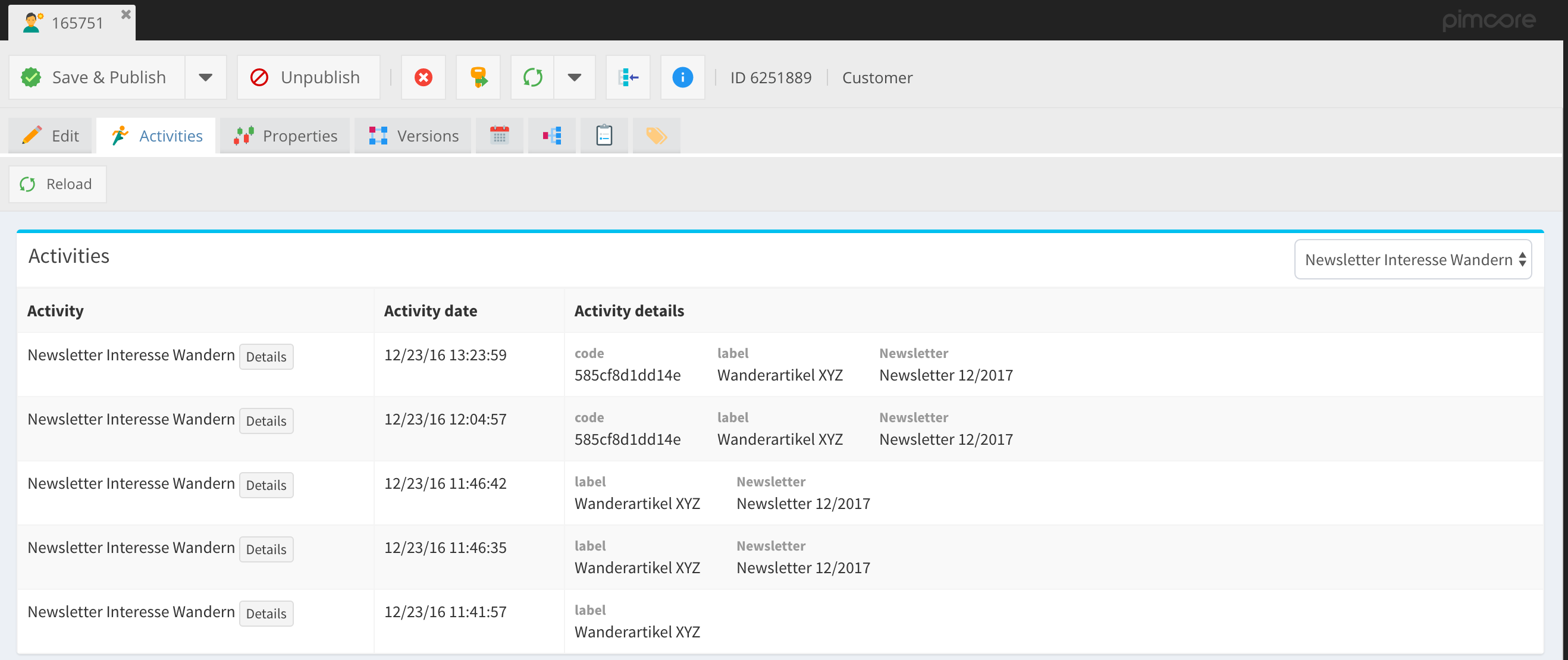

Control How Activities Are Displayed in the ActivityView
Implement these three methods of ActivityInterface to control how activities appear in the ActivityView:
<?php
/**
 * Returns an associative array with data to show, in addition to the type and activity date, in the
 * ActivityView overview list.
 *
 * @param ActivityStoreEntryInterface $entry
 *
 * @return array
 */
public static function cmfGetOverviewData(ActivityStoreEntryInterface $entry);

/**
 * Returns an associative array with data to show on the ActivityView detail page.
 *
 * @param ActivityStoreEntryInterface $entry
 *
 * @return array
 */
public static function cmfGetDetailviewData(ActivityStoreEntryInterface $entry);

/**
 * Optional: returns a template file to use for the ActivityView detail page, so you can implement a fully
 * custom detail page per activity type.
 *
 * @param ActivityStoreEntryInterface $entry
 *
 * @return string|bool
 */
public static function cmfGetDetailviewTemplate(ActivityStoreEntryInterface $entry);
Include Links to Pimcore Elements (e.g. Objects) in the Activity View
Example: Link to a Data Object in the Detail View
<?php

public static function cmfGetDetailviewData(ActivityStoreEntryInterface $entry)
{
    /**
     * @var ActivityViewInterface $activityView
     */
    $activityView = \Pimcore::getContainer()->get('cmf.activity_view');

    return ['data object' => $activityView->createPimcoreElementLink(3, 'object')];
}
Example: Link to an Asset in the Overview, with a Custom CSS Class and Label
<?php

public static function cmfGetOverviewData(ActivityStoreEntryInterface $entry)
{
    /**
     * @var ActivityViewInterface $activityView
     */
    $activityView = \Pimcore::getContainer()->get('cmf.activity_view');

    return ['asset' => $activityView->createPimcoreElementLink(3, 'asset', 'btn btn-xs btn-success', 'open asset')];
}
ActivityStore Entry Metadata
You can store metadata items on activity store entries. This is useful, for example, for a segment builder that needs to record whether it already processed an activity.
Examples
<?php

$entry = $activityStore->getEntryById(465374);

// get all metadata items
$data = $entry->getMetadata();

// get a single metadata item
$data = $entry->getMetadataItem('BookingSegmentBuilder state');

// overwrite a single metadata item
$entry->setMetadataItem('BookingSegmentBuilder state', 'processed');
$entry->save();

// overwrite all metadata items (drops all other metadata keys)
$entry->setMetadata([
    'BookingSegmentBuilder state' => 'processed',
]);
$entry->save();