MailChimp/Newsletter Sync
CMF has built-in support for synchronizing customer data with MailChimp. It synchronizes configured parts of customer data, and can optionally export mail templates based on Pimcore mail documents.
Integrate other newsletter systems by implementing NewsletterProviderHandlerInterface.
Configuration
Enable newsletter synchronization in the CMF configuration. Additional settings include:
newsletterQueueImmediateAsyncExecutionEnabled: synchronizes the customer with MailChimp on every save.- MailChimp API settings.
CMF can also handle multiple MailChimp lists; each list is a separate Symfony service tagged
cmf.newsletter_provider_handler.
See Configuration for an example service definition and the general newsletter-related settings.
See Multiple Mailchimp Accounts to handle lists across different Mailchimp accounts.
Prepare Data Objects for MailChimp Sync
Customer
Add a newsletterStatus and mailchimpStatus field to the customer class for each MailChimp list:
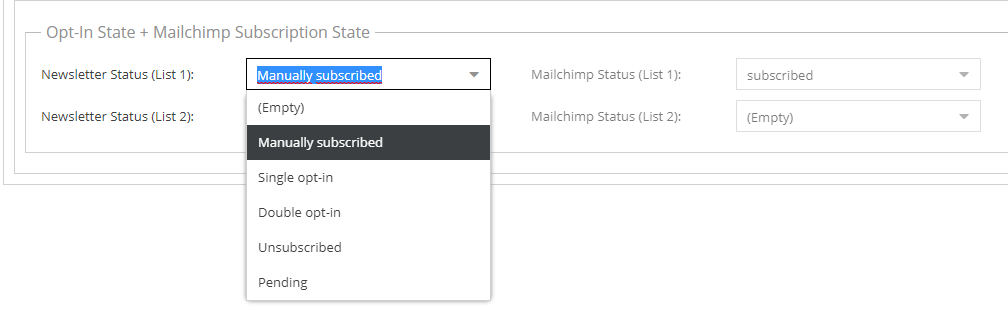

Suffix each field name with the shortcut of the associated provider handler, for example newsletterStatusList1 and
mailchimpStatusList1.
The newsletter status is project-specific. Map its options to the MailChimp status options in the provider handler's service definition.
The MailChimp status must be a read-only field with these options:
subscribedunsubscribedpendingcleaned
When the MailChimp sync feature is enabled, the customer data object class must implement
MailchimpAwareCustomerInterface, which declares one method:
public function needsExportByNewsletterProviderHandler(NewsletterProviderHandlerInterface $newsletterProviderHandler);
Use this method to decide whether a customer needs to be exported to a given MailChimp list, typically by checking the provider handler's configured shortcut. This lets you build different lists with different customers based on custom rules.
CustomerSegmentGroup
Besides customers, you can also export customer segments as interest groups to MailChimp. Add a checkbox named
exportNewsletterProvider{PROVIDER_HANDLER_SHORTCUT} for each list to the CustomerSegmentGroup class. See
Exporting CustomerSegments to MailChimp below for details.
Exporting Customers to MailChimp
Newsletter Queue
Exporting customer data to MailChimp is asynchronous. Each time a customer is saved, it is added to the newsletter queue, represented by a database table.
A background cron job, which should run every few minutes, processes the queue items and removes each one once it is successfully processed. If the sync fails (for example because MailChimp does not respond correctly), the item stays in the queue and is retried later. See also Cron Jobs.
Immediate Execution of Export on Customer Save
Although the export is asynchronous, you can enable immediate processing of a queue entry right after a customer is saved. This still runs as a background task; it only triggers the queue asynchronously for that one saved customer. If the export is not successful, the entry stays in the queue.
The config option for this behavior is newsletterQueueImmediateAsyncExecutionEnabled (see
Configuration).
Webhook
CMF offers a MailChimp webhook endpoint to receive updates from MailChimp. It is implemented as a webservice and handled the same way as the Pimcore core REST webservice.
To enable the webhook:
-
Enable the Pimcore core webservice feature.
-
Create a Pimcore user for handling the webhook, for example
mailchimp-webhook. -
Generate an API key for that Pimcore user.
-
Add a webhook in the MailChimp web interface with this URL:
https://mydomain.com/__customermanagementframework/webservice/mailchimp/webhook?apikey=53c5f6f3427545e712fe59ce043489f86ee0eb4b64a7c098d89d4288167eec1cConfigure the webhook like this:
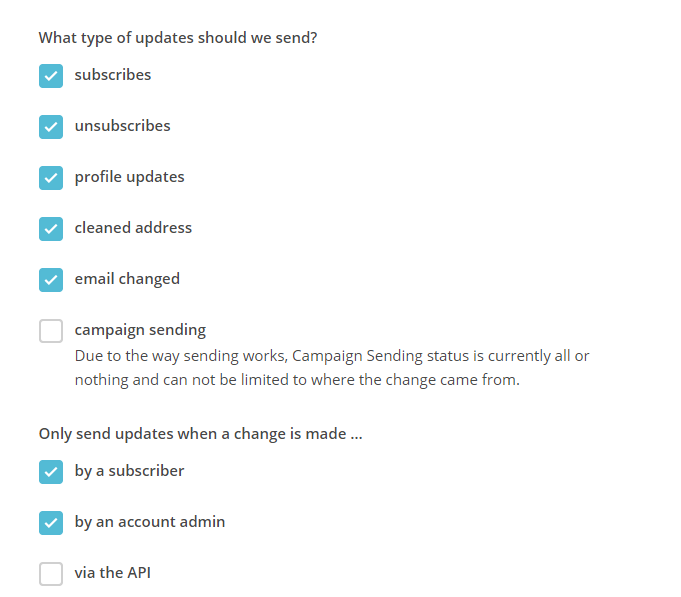

Pimcore should be the master database. Do not allow changes to user data (for example interest groups) from within MailChimp. CMF processes updates to simple merge fields, but it is safer to disallow such updates on the MailChimp side. Customer segments and interest groups can never be synced back to Pimcore.
Cron Job for Syncing Data from MailChimp to Pimcore
The webhook syncs MailChimp updates to Pimcore close to real time, but this can fail, for example when the server is down. CMF offers an additional cron job, which can run once a day, to synchronize any updates that were missed. See also Cron Jobs - Mailchimp status sync.
Exporting CustomerSegments to MailChimp
Customer segment exports are also handled by the newsletter queue. Because MailChimp limits a list to 60 interest groups (the MailChimp equivalent of CustomerSegments), CMF lets you configure which CustomerSegmentGroups to export; all segments within a selected group are exported.
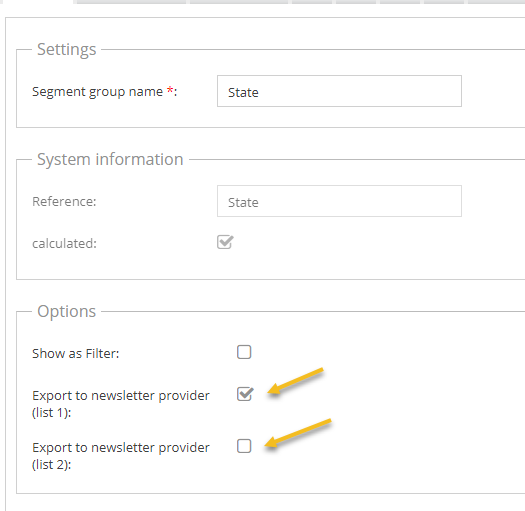

Add a checkbox exportNewsletterProvider{PROVIDER_HANDLER_SHORTCUT} for each provider handler (MailChimp list) to the
CustomerSegmentGroup data objects. The shortcut is capitalized in the field name, so a provider handler with the
shortcut list1 needs the field exportNewsletterProviderList1.
Exporting Newsletter Templates to MailChimp
Once the newsletter sync is enabled, an "Export Template to MailChimp" button appears on email documents:


Use it to build the newsletter in Pimcore and then use it for email campaigns in MailChimp.
Logging
CMF logs MailChimp sync activity at three levels:
- Customer activities are tracked on each MailChimp status change.
- The customer's notes and events tab lists successful exports.
- Errors are logged to the application logger.