Installation
Datahub Productsup is an enterprise bundle. It requires a Pimcore enterprise subscription.
Prerequisites
The bundle requires Pimcore 2026.1 or later and PHP 8.4 or 8.5.
Datahub
(pimcore/data-hub),
Datahub File Export
(pimcore/data-hub-file-export), pimcore/studio-backend-bundle, pimcore/studio-ui-bundle,
pimcore/ecommerce-framework-bundle and pimcore/enterprise-subscription-tools are Composer dependencies.
Composer pulls them in automatically, and the bundle registers Datahub and Enterprise Subscription Tools as
dependent bundles, so those two are loaded without manual bundle ordering.
Loading Datahub this way does not install it, and Datahub File Export is not registered as a dependent bundle at all. Both need to be enabled and installed on their own, see steps 2 to 4 below:
- Datahub's own installer creates the
plugin_datahub_configpermission and the Datahub permission category that Productsup depends on. - Productsup's exporters (
ProductsupandStudioProductsup) extend Datahub File Export'sAbstractExporter, and theQueuesave hook (see Basic Configuration) stores its queue entries in theplugin_datahub_queue_itemtable that Datahub File Export's installer creates.
The Order Endpoint additionally requires the Pimcore Ecommerce Framework bundle (PimcoreEcommerceFrameworkBundle)
to be enabled and configured. Orders are created through its Order Manager
(Pimcore\Bundle\EcommerceFrameworkBundle\Factory). Skip this if you only use the Delivery Endpoint.
A custom bundle that extends Productsup has to be loaded after PimcoreDataHubProductsupBundle, which in turn has
to be loaded after PimcoreDataHubFileExportBundle. Set bundle priorities in config/bundles.php accordingly.
Installation Process
- Install the package:
composer require pimcore/data-hub-productsup
- Enable the bundle in
config/bundles.php. Datahub File Export must be enabled as well, and loaded before Productsup:
use Pimcore\Bundle\DataHubFileExportBundle\PimcoreDataHubFileExportBundle;
use Pimcore\Bundle\DataHubProductsupBundle\PimcoreDataHubProductsupBundle;
// ...

return [
    // ...
    PimcoreDataHubFileExportBundle::class => ['all' => true],
    PimcoreDataHubProductsupBundle::class => ['all' => true],
    // ...
];
- Install Datahub, if it is not installed yet. Enabling it as a dependent bundle only loads it, it does not create
the
plugin_datahub_configpermission and the Datahub permission category that Productsup depends on:
bin/console pimcore:bundle:install PimcoreDataHubBundle
- Install Datahub File Export, if it is not installed yet. Its installer creates the
plugin_datahub_queue_itemtable used by Productsup'sQueuesave hook:
bin/console pimcore:bundle:install PimcoreDataHubFileExportBundle
- Install the bundle:
bin/console pimcore:bundle:install PimcoreDataHubProductsupBundle
Depending on how deliveries are triggered, an additional cron job is needed. See Export Setup.
Verify the Installation
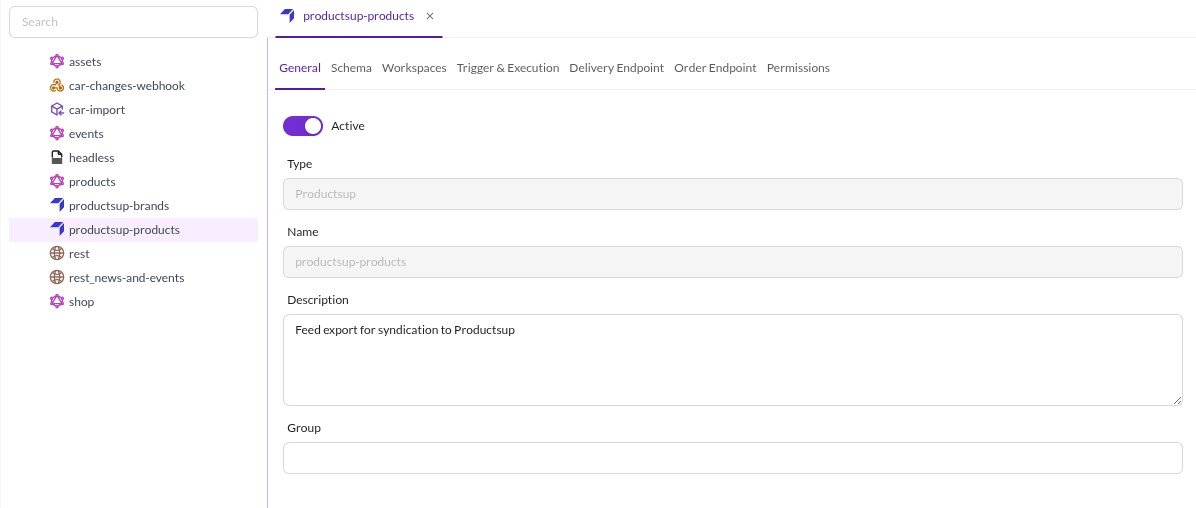
After installing, the Productsup adapter appears in the Datahub configuration panel in Pimcore Studio, under Automation & Integration > Data Hub Configuration.

User Permissions
Access is checked on two levels:
- Opening the Datahub configuration panel at all requires the
plugin_datahub_configpermission, or anadminuser. This permission comes from Datahub and is shared with every adapter. It is enforced on the Studio Backend controllers with#[IsGranted], so it protects the API, not only the UI. - The installer adds
plugin_datahub_adapter_productsup("Datahub Adapter - Productsup") to the Datahub permission category. It controls whether a user may use the Productsup adapter.
Access to an individual configuration is granted per user and role in its Permissions tab. Both levels are
evaluated by Pimcore\Bundle\DataHubBundle\Configuration::isAllowed(), which resolves in this order:
- Admin users and users holding
plugin_datahub_adminare always allowed. - If the configuration has no entries in its Permissions tab,
plugin_datahub_adapter_productsupdecides. - As soon as the tab holds at least one user or role entry, only those entries are evaluated and
plugin_datahub_adapter_productsupis ignored.
Next Steps
- Basic Configuration: configure a Productsup endpoint.
- Export Setup: schedule delivery exports.
- Customize and Extend: plug in a custom exporter service.
- Events: hook into delivery and order import.
- Upgrade Notes: breaking changes per release.