Development Documentation
This section describes the technical concepts and extension points of the Pimcore targeting engine, for developers who need to consume targeting data in custom code or extend the engine with custom conditions, data providers, action handlers or storage. For usage and feature descriptions, see the user docs first.
Setup
Enable targeting as described in Installation. If you want to use geo-related conditions (Country, Geo Point) in your targeting rules, configure the underlying GeoIP data provider first.
Configuring the MaxMind GeoIP Data Provider
Follow the official instructions to obtain and update the
GeoIP database. Store the database file wherever you like; the default location used by geoipupdate is
/usr/share/GeoIP/GeoLite2-City.mmdb.
Set the path to the database file under parameters in your config/services.yaml to enable geo support:
parameters:
    pimcore.geoip.db_file: /usr/share/GeoIP/GeoLite2-City.mmdb
Basic Concepts
| Concept | Description |
|---|---|
VisitorInfo | Contains run-time information about the current visitor. All conditions and action handlers use it to collect and apply data. |
DataProvider | Fetches data about the current visitor for other components such as conditions to use. For example, the Device data provider loads device info from the user-agent string. Data loads on demand, only when a component actually needs it. |
Condition | A logical block, combinable with others, that matches or doesn't match the current visitor. Configured on global targeting rules in Pimcore Studio. |
ActionHandler | Executes one of the actions a targeting rule runs when its conditions match. For example, the Redirect action handler creates a RedirectResponse that redirects the visitor to another page. |
Storage | Where visitor data persists between requests. Each storage implementation supports the session and visitor scopes. Session-scoped data is valid only for the current session, either through a fixed expiry time (the default Cookie storage expires session data 30 minutes after its last update) or through the storage's own mechanics (for example, Session storage relies on the PHP session lifetime). Visitor-scoped data should persist for the visitor's whole lifetime, though this depends on the storage in use (Session storage, for instance, cannot do this). Storage engines include cookie, JWT-signed cookie, database, session and Redis, each with its own trade-offs. |
Targeting Rule | A condition/action combination that runs one or more actions when its conditions match (similar to pricing rules in the Ecommerce Framework). Targeting rules run on every request by default, but their scope (hit, visitor, session, session with variables) can limit that. |
Target Group | An entity you target content for. A document or snippet can define personalized content for a specific target group (for example a special banner for an "Outdoor Interested" target group). Matching targeting rules, and configuring target groups to track on documents, assigns a visitor a list of target groups; these are stored and added to the VisitorInfo object at runtime. When rendering a document, a DocumentTargetingConfigurator selects the content that best matches the target groups on the VisitorInfo. |
VisitorInfo and Visitor ID
When handling a request, the targeting engine first creates a new VisitorInfo instance: a data container used
throughout the targeting process to store and pass data between the system's components.
See Visitor Info for details.
Targeting Rule Matching
After building the VisitorInfo and resolving the visitor ID, the matching engine processes every defined
targeting rule. A rule's scope can cause it to be skipped (for example, a session rule runs only once per
session). Every condition receives the VisitorInfo instance and decides whether it matches its configured data.
To fetch additional visitor data, a condition can request data from one or more DataProvider implementations. For
example, the Device data provider resolves and caches device info from the user-agent string using the
DeviceDetector library. The Operating System condition declares the Device data provider as a dependency and
can rely on the device data being added to the VisitorInfo before matching runs. The targeting engine requests
data from a given data provider only once per request, even if multiple conditions depend on it.
If a rule matches, its actions run. Example actions include issuing a redirect or assigning a target group to the current visitor. Actions, executed by action handlers, can request data from data providers the same way conditions do.
Targeting Storage
Some data needs to persist between requests. The targeting engine uses a TargetingStorage, a key-value store for
targeting data. Data can be set at the visitor scope (valid for the visitor's whole lifetime) or the session
scope. When storing data to an external storage, the engine uses the resolved visitor ID to store data for a
specific visitor.
Examples of data persisted to storage:
- Assigned target groups, either set from targeting rules or tracked automatically when visiting a document that has target groups configured on its Target Groups panel.
- Rules with
sessionscope that already matched, so they aren't re-applied for the same visitor. - The time of the first request in the current session, to calculate time on site.
For further details, see Targeting Storage.
Content Targeting
After matching all rules, a VisitorInfo may have several assigned target groups. When rendering a document that
has targeted content for multiple target groups, Pimcore applies the following logic to pick which version to show
the current visitor:
- If the visitor has only one assigned target group and content exists for that target group, Pimcore uses the personalized version for that target group.
- If the visitor has multiple assigned target groups, Pimcore sorts them by assignment count and uses the first target group in that list that has personalized content for the document.
This logic runs for every document and sub-request, so a document can show personalized content for one target group while a snippet or renderlet on the same page shows content for a different target group.
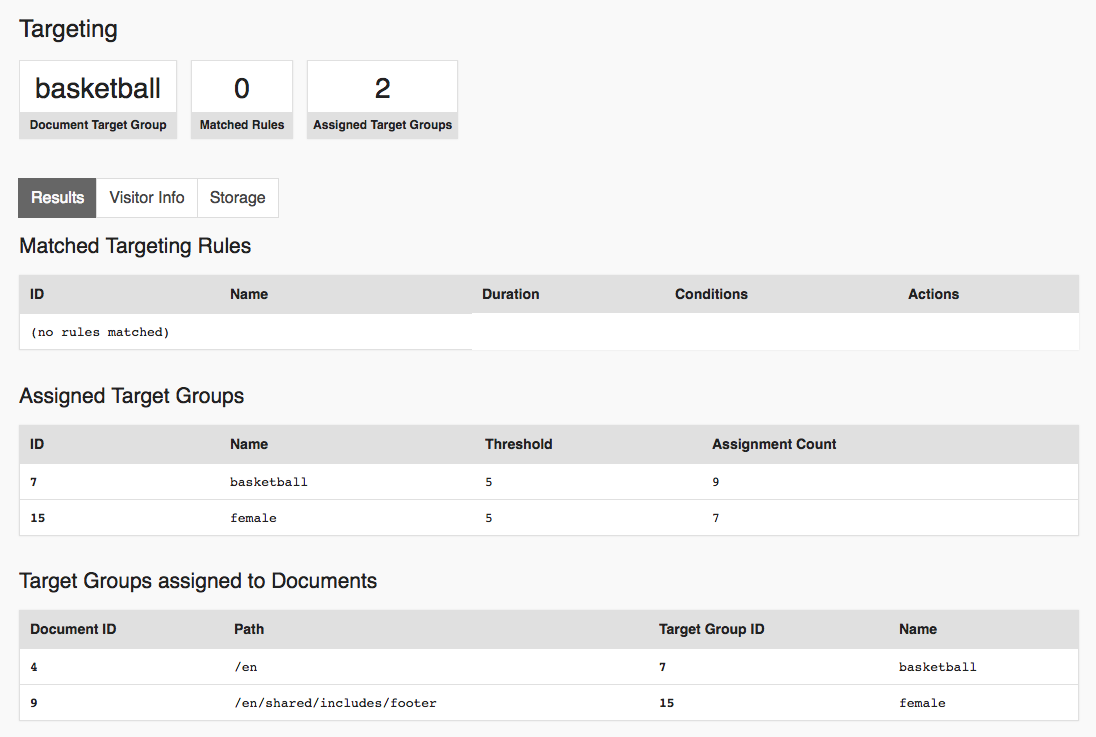
You can see which target groups were applied to which document in the profiler. In the screenshot below, the main
document used the target group basketball while the footer snippet was rendered with the target group female.

Manually Applying Content Targeting
Pimcore applies the logic above automatically to documents loaded through its standard routing and rendering. To
apply it to any other document, use the DocumentTargetingConfigurator service. For example, when handling a
document inside a controller registered as a service:
<?php

namespace App\Controller;

use Pimcore\Controller\FrontendController;
use Pimcore\Model\Document;
use Pimcore\Bundle\PersonalizationBundle\Targeting\Document\DocumentTargetingConfigurator;
use Symfony\Component\HttpFoundation\Response;

class ContentController extends FrontendController
{
    public function pageAction(DocumentTargetingConfigurator $targetingConfigurator): Response
    {
        // load any document
        $document = Document::getByPath('/my/page');

        // configure personalized content based on resolved target groups
        // and available personalized content on the document
        $targetingConfigurator->configureTargetGroup($document);

        //...
    }
}
Extending the Targeting Engine
Third-party code can extend and customize the targeting engine's behavior in several ways:
- Conditions: add custom matching logic for targeting rules.
- Data Providers: fetch and cache additional visitor data for conditions and action handlers to use.
- Action Handlers: add custom actions for targeting rules to run.
- Targeting Storage: plug in a custom store for visitor and session data.
- Frontend JavaScript: extend the client-side visitor ID and code-injection mechanism.
- Events: hook into the targeting lifecycle and the Personalization Studio API responses.
Debugging Targeting Data
As shown above, targeting data is added to the Symfony profiler. Pimcore Studio also provides an on-page targeting
toolbar that works outside the dev environment as long as you're logged in.

Open Pimcore Studio, go to Personalisation / Targeting > Targeting Toolbar and click Activate. This sets a
pimcore_targeting_debug cookie in your browser; the toolbar then appears on every page you visit while logged
into Studio, until you deactivate it again from the same panel. Since the toolbar only renders for an authenticated
Studio user, it never appears for anonymous visitors.
Opt-in for Targeting
A visitor can enable targeting for themselves at any time by setting the pimcore_targeting_enabled=1 cookie in
their browser, regardless of the pimcore_personalization.targeting.enabled configuration.
Since privacy laws vary from country to country, consult your legal team before relying on this behavior.