Version: Next

Duplicate Detection (Experimental)

caution

This is an experimental feature, built on the experimental Embeddings feature. Configuration, data format, and APIs may still change in breaking ways between releases.

The bundle finds duplicate and near-duplicate elements — data objects and image assets — and surfaces them for the review. Detection reuses the vectors and content hashes the Embeddings feature already produces.

How detection works

Detection runs in two tiers per scope:

  • Exact — elements whose composed content hashes identically.
  • Fuzzy — near duplicates, found by probing the vector index with each element's own stored vectors and retrieving its nearest neighbors. The vector only generates candidates;
  • a dedicated scorer decides: MinHash-based Sørensen–Dice similarity for text and cosine for images.

Stored vs. shown: two thresholds, two different costs

Two thresholds gate a fuzzy finding, at two different points in time, and mixing them up is the most common misconfiguration:

  • candidate_floor gates what is stored, at analysis time. A candidate scoring below it is never written — not hidden, gone.
  • review_threshold gates what is shown, at read time, applied to both a group's top score and each member's score.

This makes the two options asymmetric in what changing them costs:

ChangeNeeds a run?
Raising or lowering review_thresholdNo — it is a read-time filter over what is already stored.
Raising candidate_floorNo new run required, but the next run discards everything that now falls below it.
Lowering candidate_floorYes — requires a full run. Candidates between the old and new floor were never stored, because the previous run discarded them at the door. An incremental run cannot recover them; only re-analysing the scope from scratch can.

The bundle enforces the last row: starting an incremental run after any effective floor was lowered since the last run is refused. Pass --full (CLI) or Save & Full Detection (Studio) instead.

Clustering

The probed element always anchors its own cluster — a pair is stored once, owned by its lower element id, so two elements probing each other can never write two rows about the same pair. The cluster is then capped to max_members_per_group candidates, after structural filtering so an element the filter would drop anyway never spends the cap.

The field-element score

Text duplicates are scored using Sørensen–Dice similarity over the canonical set of field-value elements extracted from each record. This is the fraction of agreeing field values: an exact copy scores 1.0, and a record differing in 2 of 14 field values scores ≈0.86. The score is estimated via MinHash over hashed field=value elements.

Element rules (see the field-element scoring design notes in the repository's docs/ folder for full rationale):

  • One element per atomic value:.
  • Order-immune: multi-value and relation storage order does not affect scoring.
  • Normalized values: lowercase, whitespace collapsed, and diacritics folded (StraßeStrasse), so spelling variants are treated identically.
  • Opaque identifiers dropped: hex hashes (16+ hex digits) and UUIDs are excluded automatically.
  • Long-text fields bounded: WYSIWYG and textarea fields contribute exactly 8 slot-tagged sketch elements each, derived from a per-field MinHash over the field's own word shingles. This ensures a shared boilerplate description does not dominate the pair, while near-identical long text still earns partial credit.

Structural filters

Some matches are dropped unconditionally, before scoring is even relevant, because no data model makes merging them correct:

  • Ancestor/descendant — unconditional. A container is never the same record as its content. Two elements where one path contains the other are never proposed as duplicates, regardless of score.
  • Same-class siblings — per class, default suppressed. A sibling of the anchor (or anything in its subtree), sharing both a parent data object and a class, is suppressed by default (suppress_same_class_siblings: true). This is what keeps product variants from flooding the review queue. Set suppress_same_class_siblings: false for that class to let same-folder siblings compete normally. The setting is keyed per class for exactly this reason — one embedded catalogue can contain both structures at once.

The Studio editor

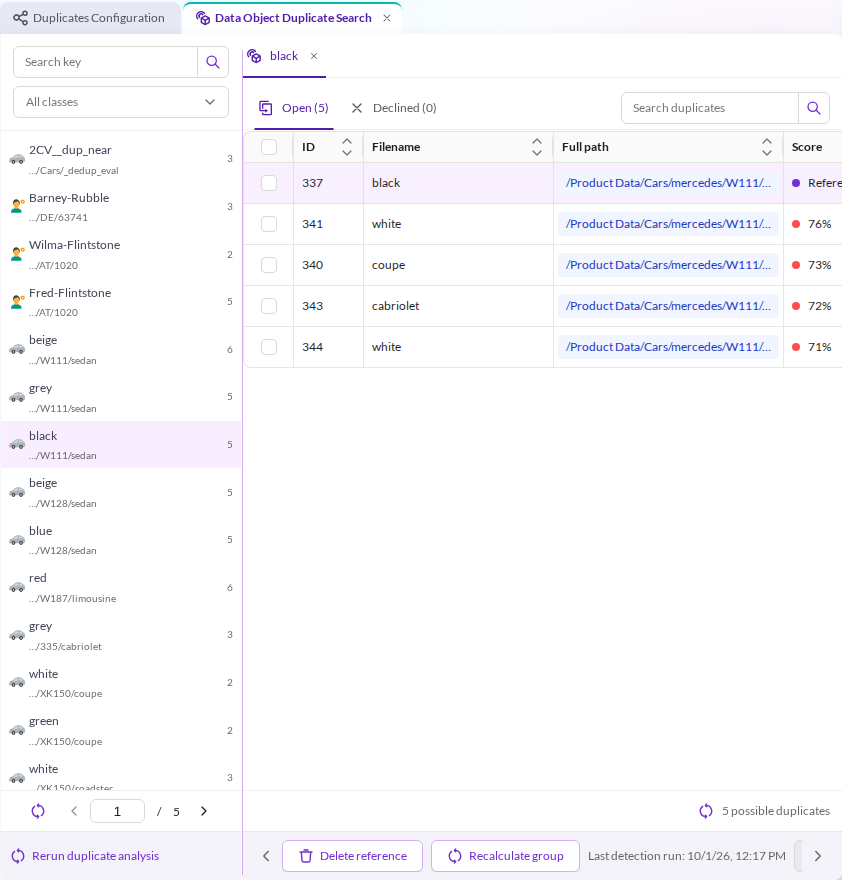
All of the above — thresholds, scope, per-class suppression — is editable through the Studio editor, at Automation & Integration → Pimcore Embeddings → Duplicates Configuration in the main navigation (admin users only). Saving and triggering a run are separate concerns, exposed as three buttons:

ButtonEffect
SavePersists the configuration only. No analysis run is started.
Save & DetectPersists, then starts an incremental run (confirmation required). Refused — before anything is queued — if it would violate the lowered-floor rule above.
Save & Full DetectionPersists, then starts a full run that re-analyses every element in scope, instead of only what changed, and allows the reconcile step to withdraw findings the run no longer produces. Admin-only. Confirmation is a destructive-style (red) prompt, since this is the required recovery step after lowering a candidate floor.

Only one analysis run per scope is allowed at a time.

Configuration reference

Every option below is editable through the Studio editor (subject to Configuration storage) unless marked deploy-time only.

Installation defaults

Every other option has an effective default the configuration tree fills in on read, even though the seeded row leaves it unset:

OptionEffective default
candidate_floor0.70 — min score stored; lowering it later requires a full run.
review_threshold0.70 — min score shown; a read-time filter, no run required.
candidates_per_probe50
max_probe_chunks (incremental)3
max_probe_chunks_full (full runs)1 — deliberately lower, see Incremental vs full detection below.
max_members_per_group~ (null) → follows candidates_per_probe
objects.usage~ (null) → canonical object_dedup usage
objects.candidate_floor~ (null) → falls back to the global candidate_floor
objects.classes{} → no class detected until named here and given its own enabled: true
objects.classes.*.enabledfalse — opt-in per class
objects.classes.*.suppress_same_class_siblingstrue
objects.classes.*.path_prefix''
assets.path_prefix'' (whole tree)
assets.usage~ (null) → canonical image_dedup usage
assets.candidate_floor~ (null) → falls back to the global candidate_floor

Full descriptions of each option are in Top level and objects and assets — scope below.

Top level

OptionDefaultDescription
enabledfalseMaster switch for duplicate detection and the review UI. Off by default: set to true and configure at least one of objects/assets to activate.
candidate_floor0.70Minimum score stored. Raising it discards candidates on the next run; lowering it requires a full run, because candidates below the previous floor were never written — see Stored vs shown.
review_threshold0.70Minimum score shown, applied at read time to both a group's top score and each member's score. Changing it needs no re-analysis. Defaults to the candidate floor — show everything stored — because measured near-duplicate findings cluster below 0.85, and a higher default would hide the entire near-duplicate tier. Raise it to quieten the review queue once the data is understood.
candidates_per_probe50kNN k — how many neighbours one probe retrieves.
max_probe_chunks3Text only. How many of an element's chunk vectors probe during an incremental run. Cost multiplies by this.
max_probe_chunks_full1Text only. The same cap for full runs, lower by default because a full pass pays it once per element across the whole scope.
max_members_per_group~ (null)How many candidates are kept per anchor. Defaults to candidates_per_probe: below it, retrieval is wasted; above it, the cap is decorative for a single-probe image field. Raising it beyond k means raising candidates_per_probe too, which costs detection time.

objects and assets — scope

OptionDefaultDescription
objects.enabled / assets.enabledfalseDetect duplicates among data objects / image assets.
assets.path_prefix''Restrict assets to elements whose full path starts with this prefix. See Anchor-only path prefix below.
objects.usage / assets.usage~ (null)Config-only escape hatch — there is no Studio editor field for it on either scope. The embedding model is normally derived from the app's canonical dedup usage for the modality (object_dedup / image_dedup, or any other usage of the matching modality); usage is only needed to disambiguate when several different models share that modality. Must name a registered usage.
objects.candidate_floor / assets.candidate_floor~ (null)Overrides the global candidate_floor for this scope. Text (MinHash) and image (cosine) scores live on different scales, so one floor rarely fits both. Lowering it requires a full run, like the global one.
objects.classes{}Keyed map, ClassName: { enabled, suppress_same_class_siblings, path_prefix } — see Per-class objects configuration below. Empty means no class is detected, even if embedded — detection is opt-in per class. Naming a class here only makes it eligible; it still needs its own enabled: true. Keys must be a subset of the classes configured under embeddings.objects.classes; an entry naming a class embeddings does not cover is rejected at save time.

Per-class objects configuration

ControlConfig keyDefaultDescription
EnabledenabledfalseDetect duplicates for this class. Off by default — opt in per class rather than every embedded class being swept automatically.
Suppress same-class siblingssuppress_same_class_siblingstrueSuppress a same-class sibling (or anything in its subtree) that shares a data-object parent with the anchor. See Structural filters for why this defaults on for product-variant-shaped classes and is typically turned off for classes like news articles, where same-folder same-class matches are exactly what should be flagged.
Path prefixpath_prefix''Restrict this class to elements whose full path starts with the prefix.

Coupling to the embeddings configuration

Duplicates configuration is not self-contained — it derives its classes and its model from the embeddings configuration, so a change there ripples into duplicates in two independent ways.

A class removed from embeddings.objects.classes. On read, the now-unembedded class is stripped out of objects.classes and a warning is logged; a save that still names it is rejected. Detection stops using it immediately — classes are resolved from the embeddings configuration, not the stored duplicates config — and its existing groups are withdrawn on the next detection run.

Disabling asset embeddings, or the embeddings master switch. This pauses the corresponding duplicates scope rather than erroring: the read path forces that scope's enabled to false, a save that tries to enable an unavailable scope is rejected.

caution

Withdrawal here is destructive, not a pause — the groups are deleted, not just hidden. Re-enabling the class or the embeddings switch only makes the scope eligible again; rebuilding its groups needs a full detection run, and review status (declined/restored) on the withdrawn groups does not carry over to the rebuilt ones.

Configuration storage (config_location)

Like the embeddings configuration, the duplicates configuration is a Pimcore location-aware configuration: read source and write target are chosen per installation.

pimcore_backend_power_tools:
config_location:
duplicates:
write_target:
type: settings-store # default; also: symfony-config, disabled
read_target:
type: ~ # default; also: settings-store, symfony-config
SetupBehaviour
Defaults (as shipped)Reads container config first, settings store as fallback — a hand-written pimcore_backend_power_tools.duplicates yaml node therefore takes over and the Studio editor turns read-only. Saves go to the settings store.
write_target.type: symfony-configStudio saves write yaml files into var/config/backend_power_tools_duplicates/, which are loaded back into the container config — a version-controllable workflow. Writing is only permitted in debug mode, so production editors are read-only under this target.
write_target.type: disabledThe Studio editor is read-only everywhere; the configuration is fully deploy-managed.
read_target.type: settings-storeReads come ONLY from the settings store — a yaml duplicates node is ignored entirely (no shadowing).
read_target.type: symfony-configReads come ONLY from yaml/container config; the settings store is ignored.
caution

Pointing read_target and write_target at different locations makes the editor write where reads never look — saves appear to vanish. Pick a matching pair unless you know exactly why not.

Deploy-time: duplicates_execution

Two things about how a run behaves are never stored or Studio-editable, even when config_location.duplicates points elsewhere — they are cluster-operations knobs, not content configuration, and belong in config/packages/*.yaml:

pimcore_backend_power_tools:
duplicates_execution:
budget:
max_elements_per_run: 0 # 0 = unlimited
max_runtime_seconds: 0 # 0 = unlimited
cluster_courtesy:
throttle_ms: 0 # pause between index requests; 0 = go as fast as the cluster allows
request_timeout_ms: 30000 # per-request timeout on the search engine
OptionDefaultDescription
budget.max_elements_per_run0 (unlimited)Caps how many elements one run processes before it stops at its checkpoint.
budget.max_runtime_seconds0 (unlimited)Caps how long one run may take before it stops at its checkpoint. Combined with the resume cursor, this is how a large first full pass is spread across several maintenance windows instead of run in one sitting: the run stops cleanly at a page boundary, and the next invocation picks up exactly where it left off.
cluster_courtesy.throttle_ms0Pause between index requests. Detection shares the search thread pool with Studio search and production kNN queries, so a busy cluster may need headroom; raising this trades run duration for that headroom. 0 goes as fast as the cluster allows.
cluster_courtesy.request_timeout_ms30000Per-request timeout on the search engine, applied to both anchor reads and probes, so one pathological query cannot hold a search thread indefinitely.

Both budgets stop a run at its checkpoint, never mid-page, so resuming after a budget cutoff is exact — no element is re-scanned or skipped because of where a previous run happened to stop.

Runs

An incremental run only (re-)analyses what changed since the last completed run for that scope (plus anchors whose stored group something else invalidated); a full run re-analyses everything in scope instead. Full is required after lowering any effective candidate_floor — see Stored vs shown.

Only one analysis run per scope is allowed at a time (runs on disjoint scopes may overlap).

Incremental vs full detection

Save & Detect (CLI: bpt:duplicates:analyze) and Save & Full Detection (CLI: --full) are not just "less work vs more work" — the choice drives four different mechanics:

  1. Selection. Incremental sweeps only elements changed since the scope's last completed sweep, plus the anchors of groups something else invalidated. The very first run for a scope has no watermark to select from, so it falls back to a full sweep automatically.
  2. Probe depth. Incremental probes up to max_probe_chunks (3) of an element's chunk vectors; full uses the lower max_probe_chunks_full (1), since a full pass already pays that cost once per element across the whole scope. The cap follows the actual selection, not the requested mode — an incremental run that falls back to full (case 1) also uses the full cap, never triples its probes.
  3. Retraction. Detection only ever upserts. The reconciled step — deleting groups this run no longer produced, then suppressing the groups they contained — is queued only for full runs: after an incremental sweep, "not visited" cannot be told apart from "no longer a duplicate," so retracting anything would delete live findings from the part of the scope the sweep never reached. Once the reconcile step's withdrawOutOfScope starts, it runs to completion unconditionally — it is a single bounded delete per scope, cheap enough to never need its own cancellation check; a cancel that lands before this step is reached is still caught by the handler's own entry-state gate, so a queued-but-not-yet-running reconcile message never starts it at all.
  4. Floor safeguard. Scores below candidate_floor are never stored, so after lowering the floor, incremental runs are blocked until a full run rewrites the dataset; raising it needs no full run — see Stored vs shown.

Rule of thumb: Detect is the everyday, inexpensive choice and never deletes findings; Full is for after a configuration change that alters what counts as a duplicate, or to retract stale findings — which is why its Studio confirmation is styled as destructive.

CLI

bin/console bpt:duplicates:analyze [--scope=objects|assets] [--full]
  • --scope — restrict the run to one configured scope. Omitted, all enabled scopes run.
  • --full — re-analyze everything instead of only what changed. Required after lowering candidate_floor, since candidates below the previous floor were never stored.

The command enqueues a job and exits — the actual detection runs on the pimcore_backend_power_tools_duplicates_queue transport, so a worker must be consuming it.

Progress and cancellation

A run does not execute inline — starting one (Studio or CLI) queues a Generic Execution Engine job and returns immediately. This section covers the status endpoint and the cancel endpoint that give you a real answer while it runs.

The status endpoint

GET /configurations/{configurationId}/analysis-status

PIMCORE_ADMIN-gated, and deliberately a separate endpoint from the configuration GET, so polling it never refetches the configuration while a user is mid-edit in the Studio form.

Per-page checkpoint progress

Both budgets in Deploy-time: duplicates_execution stop a sweep at a page boundary, never mid-page, and each tier's resume_cursor (stored per job run, not carried across runs) records that boundary — the exact tier's is the aggregation's continuation token, the fuzzy tier's is the last element id visited. This is what makes scanned trustworthy as a progress number: it always reflects whole pages actually processed, never a partially applied one.

Each scope's groupsFound is per-run rather than the scope's whole inventory: it counts only groups the active run itself wrote, starting at 0 and growing to match the review list's own count on a full run, or to just the groups that run confirmed on an incremental one.

Cancelling a run

DELETE /analyze

Use it to stop a run started by mistake, or to recover a run flagged staleWorkerSuspected.

What it does:

  1. Cancels the running Generic Execution Engine job run, if any.
  2. That's it — no queue purge. Every duplicate message handler re-checks the job run's live state at its own entry before doing any work. Once the state is no longer RUNNING, any message still queued behind the canceled run self-drains as a no-op the moment a worker picks it up.

Cancel stops the run within one page, not instantly. A worker mid-page finishes that page (its progress is already checkpointed — see above) before the next dispatched step message hits the now-canceled state and drains.

Idempotent. Calling the endpoint with nothing running is a no-op that still returns 200 — there is no error case for "nothing to cancel."

Cron runs and Mercure

A run started by the scheduled bpt:duplicates:analyze cron has no logged-in user to notify, so it never pushes a Mercure event — AnalysisJobRunSubscriber skips any job run owned by the system owner. The status endpoint above is unaffected by this: polling analysis-status reports a cron run's progress and completion exactly like a Studio-triggered one, since it reads the job run and DuplicateRun state directly rather than depending on the notification.