Semantic Search (Experimental)
This is an experimental feature, built on the experimental Embeddings feature. The request contract, behaviour and APIs may still change in breaking ways between releases.
Semantic search matches by meaning instead of by words. "british roadster" finds a Triumph TR 3 and a Jaguar XK140 even though neither text contains the phrase, and "red sports car" finds red sports cars by what the picture looks like, with no tagging involved.
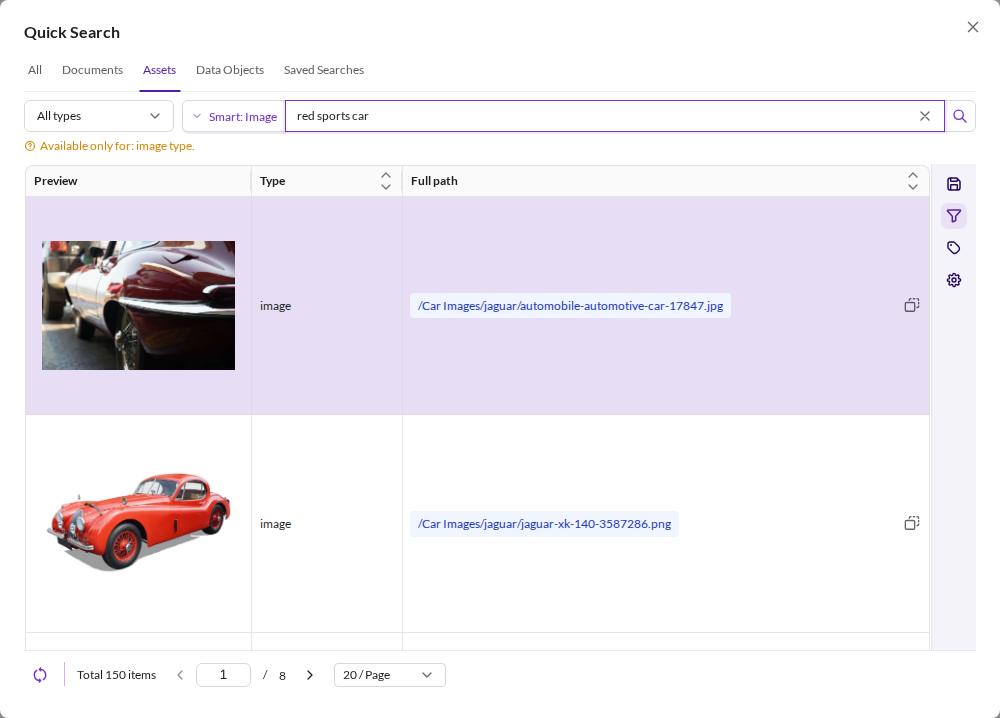

It appears as an extra search mode next to Studio's existing full-text search. Which modes are offered depends on what is embedded:
| Surface | Modes |
|---|---|
| Assets | Full text search, Smart search: Text, Smart search: Image |
| Data objects | Full text search, Smart search: Text |
| Documents | Full text search only — documents carry no embeddings |
The same modes are available in two places: the quick search dialog and the Search & Filter panel of any grid. See Search Modes.
Features
- Hybrid by construction. The semantic clause joins the same bool query as everything else, so column filters, full-text search and workspace permissions all still apply.
- Available everywhere a listing is. Quick search, asset grids and data object grids, through one registered search mode rather than a separate screen.
- Relevance you can see and cut. While a smart mode is applied the grid shows a Score column, and a score threshold hides weak matches — per request, or by a configured default per target.
- Fails visibly, never silently. If the inference service cannot embed the query, the request fails with a translated, user-facing message instead of returning non-semantic results.
- Scriptable. The same search is reachable as a column filter inside the ordinary grid request, and as a standalone endpoint.
Requirements
- Embeddings enabled, with a
semantic_text_searchusage for text search and animage_searchusage for image search. - OpenSearch, or Elasticsearch where every asset and data object index was created on 8.12.1 or newer. Older Elasticsearch indices cannot combine a kNN clause with the workspace query, so the feature is switched off rather than returning wrong results.
- The
bptb_semantic_search_permissionuser permission, see User Permissions.
Where any of these is missing, the smart modes are simply not offered — there is nothing to switch off.
Configuration
The candidate caps and the default score threshold per target are a separate configuration record, edited under System > Semantic Search Configuration (admin-only). The options, their defaults and the YAML override are documented in Embeddings Configuration.
Configuration API
Admin-only (IsGranted admin), like the duplicates configuration:
| Method | Path | operationId |
|---|---|---|
GET | /pimcore-studio/api/bundle/backend-power-tools/semantic-search-configuration/configurations/{configurationId} | bundle_backend_power_tools_semantic_search_configuration_get |
PUT | same | bundle_backend_power_tools_semantic_search_configuration_update |
configurationId is default_semantic_search. Response (BundleBackendPowerToolsSemanticSearchConfiguration):
{
  "id": "default_semantic_search",
  "isWriteable": true,
  "candidateCap": 10000,
  "globalSearchCandidateCap": 150,
  "text":  { "defaultMinScore": null, "builtInMinScore": 20, "usage": "semantic_text_search", "model": "nomic-text-v2", "queryModel": null },
  "image": { "defaultMinScore": 12,   "builtInMinScore": 8,  "usage": "image_search", "model": "siglip2-vision", "queryModel": "siglip2-text" }
}
defaultMinScoreis the configured value (null= the built-in default applies);builtInMinScore,usage,modelandqueryModelare read-only (model/query model of the usage in the embeddings config).isWriteableisfalsewhen a YAMLsemantic_searchnode shadows the store or the write target isdisabled(same rules as the embeddings configuration).PUTbody (BundleBackendPowerToolsUpdateSemanticSearchConfiguration):{ "candidateCap"?: int, "globalSearchCandidateCap"?: int, "text"?: { "defaultMinScore": number|null }, "image"?: { "defaultMinScore": number|null } }. Merge-safe: an omitted member keeps its stored value, a sent target replaces its threshold,nullclears it.defaultMinScoreis required in a sent target: an empty or malformed target is a422; omit the target to keep it. Returns the full configuration.GETreports the values as applied at search time: the caps clamped to 1..10000, a stored threshold outside 0..100 asnull. APUTmerges those sanitized values, so a hand-edited row does not fail it.- Status codes:
404unknownconfigurationId;422out-of-range or non-finite values; not writeable (isWriteablefalse, including a YAML-shadowed record) →NotWriteableException, nothing is written.
Pages in this chapter
- Search Modes: the modes in Studio, what each one matches, and where they appear.
- Grid and Search Filter: the
bpt.semanticSearchcolumn filter, result ordering, the relevance score column and threshold, and the behaviour when the inference service is down. - Global Endpoint: the standalone search endpoint, and the availability data the UI reads.