Transformation Pipeline
The transformation pipeline takes the value read from the Source of a mapping entry and converts it with a chain of operators. Each operator consumes the output of the previous one.
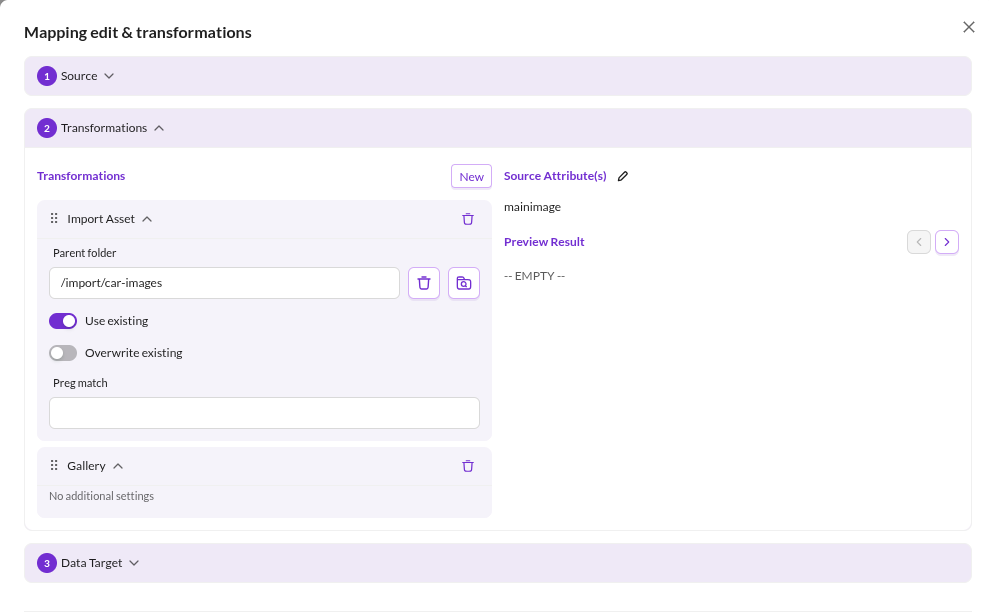

Every operator accepts certain input types and produces one output type. The Transformation Result panel shows the current result type and, when a preview file is loaded, the result for the record currently displayed.
The result type matters beyond the preview: it decides which fields the Data Target offers.
A pipeline ending in Date can only be assigned to a date field. If an operator receives an input type it cannot handle,
the configuration is rejected with an error naming the operator's position in the pipeline.
Edit the pipeline in the Advanced dialog of a mapping entry. Operators are added, reordered and removed there.
Operators
Operators are grouped in the UI the same way as below.
Data Manipulation
Operators that reshape the value without committing it to a specific Pimcore data type.
| Operator | Description |
|---|---|
| Trim | Removes whitespace. Mode selects leading, trailing, or both (default). |
| String Replace | Replaces every occurrence of Search with Replace. Applied to each item when the input is an array. |
| Static Text | Prepends or appends Text, selected by Mode. Always add also adds the text to empty values. |
| Combine | Joins an array into a string using Glue. |
| Explode | Splits a string into an array using Delimiter. Applied recursively to arrays. Keep sub-arrays preserves the nesting instead of returning one flat array. |
| Flatten Array | Collapses a nested array into a single flat array. |
| Reduce Array Key-Value Pairs | Turns a flat array ['k1', 'v1', 'k2', 'v2'] into ['k1' => 'v1', 'k2' => 'v2']. |
| HTML Decode | Applies html_entity_decode. |
| Conditional Conversion | Maps string values onto other string values. Separate multiple pairs with |, for example Original 0|1|2 and Converted some|other|values. An asterisk in Original acts as a wildcard, so 0|* with no value|default converts 0 to no value and everything else to default. |
| Object Field | Reads one attribute from a data object. Set Attribute, and Forward parameter to pass an argument to the getter. Use it after Load Data Object. |
Data Types
Operators that convert the value into a Pimcore data type so it can be assigned to a typed field.
| Operator | Description |
|---|---|
| Boolean | Casts to a boolean. |
| Numeric | Casts to a float. Return null if empty returns null for non-numeric input that would cast to 0.0, so 0 stays 0 while abc and an empty value become null. |
| Date | Converts to a date. Format is a PHP date format and defaults to Y-m-d. |
| As Array | Wraps the value in an array unless it is one already. |
| As Color | Converts an (R,G,B,A) array or a hex string to a color object. |
| As Countries | Converts an array of country display names into an array of country codes. |
| Gallery | Packs an image asset or an array of image assets into an image gallery. |
| Image Advanced | Packs a single asset into an advanced image. |
| Quantity Value | Converts an array to a quantity value. The first item is the value, the second the unit. See Quantity Value operators. |
| Quantity Value Array | Same as Quantity Value, for an array of such pairs. Returns an array of quantity values. |
| Input Quantity Value | Converts an array to an input quantity value. The first item is the value, the second the unit. See Quantity Value operators. |
| Input Quantity Value Array | Same as Input Quantity Value, for an array of such pairs. |
| Quantity Value Range | Converts an array to a quantity value range. The first item is the lower bound, the second the upper one, the third the unit. See Quantity Value operators. |
| As Numeric Range | Converts an array to a numeric range. The first item is the lower bound, the second the upper one. An empty bound stays empty rather than becoming 0, so a half-open range is kept. |
| As External Image | Wraps a URL in an external image. Nothing is downloaded; the field holds the address. |
| As Geopoint | Expects an array of latitude and longitude. |
| As Geobounds | Expects an array of north-east latitude and longitude, followed by south-west latitude and longitude. |
| As Geopolygon | Expects an array of latitude and longitude pairs, one pair per point. |
| As Geopolyline | Same as As Geopolygon. |
Quantity Value operators
The five quantity value operators share these settings:
- Unit source: where the unit comes from.
By Unit IDandBy Abbreviationread it from the second item of the input;Staticuses the unit chosen under Unit and takes only the value from the input.Quantity ValueandInput Quantity Valuelook the unit up and leave it empty if it is not found. WithStaticthey need a plain value as input, not an array.Quantity Value ArrayandInput Quantity Value Arraylook a unit up by abbreviation, but take a unit id as given: an unknown id makes the row fail. WithStaticeach element may be a plain value or an array.Quantity Value Rangereads the unit from the third item, because the first two are its bounds, and looks it up asQuantity Valuedoes. WithStaticit still needs the two bounds as an array.
- Null if no value: if the value is empty, the operator returns
null(for the array variants,nullfor that element) instead of a quantity value.0is not empty.
Without a setting the operators behave as before: Quantity Value reads the unit by id, Input Quantity Value by abbreviation, and the two array variants take the unit id as given.
Load / Import
Operators that resolve the value into an existing or newly created Pimcore element.
| Operator | Description |
|---|---|
| Import Asset | Expects an http or https URL, downloads it, and stores it as an asset in Parent folder. Other values, such as a path on the server, are never downloaded and yield no asset, unless Use existing finds one. The rejected value is logged as an error whenever a download would have been attempted. The file name is taken from the URL. Use existing reuses an asset of the same name instead of creating a suffixed copy, Overwrite existing replaces its contents. Preg match derives the file name from the capture groups of a regular expression, joined with -. |
| Load Asset | Loads an existing asset. Load strategy selects lookup by path or by id. |
| Load Data Object | Loads an existing data object by id, path, or attribute. For attribute lookup, set Class, Attribute name and, for localized attributes, Language. Accept partial match matches substrings, so foo finds an object whose attribute is barfoobar. Load unpublished also matches unpublished objects. |
What Operators Should Not Do
- Heavy calculations. Exploding a string into an array and computing statistics over it belongs in application code, not in an import. Keep the pipeline light so import performance stays predictable.
- Write to other data objects. A mapping entry writes to exactly one field of the object being imported. To update a different object, create a second import configuration.