Processing Settings
Processing settings control how the queued records are processed. They are grouped into execution, identity-based options, and logging.
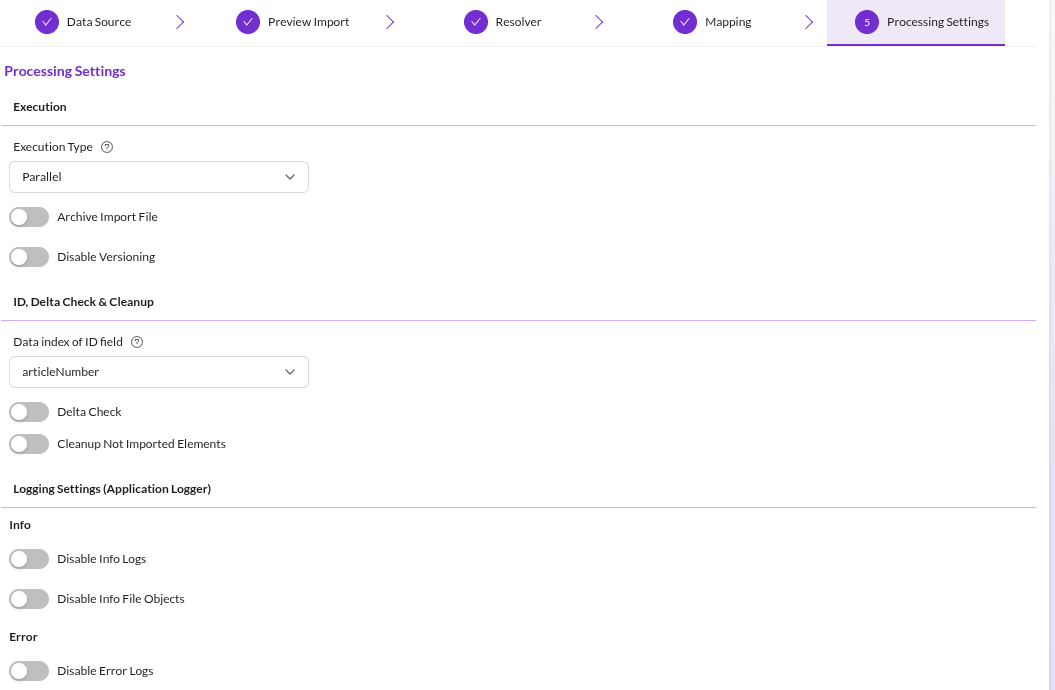

Execution
Execution Type
- Sequential: records are processed one after another, in the order they were queued. Choose this when records depend on each other, for example when the import builds a hierarchy.
- Parallel: records are processed concurrently. Faster, but the order is not guaranteed.
The two modes are processed by different queue workers. See Import Execution Details.
Archive Import File
Archives the imported file so the import stays traceable. The importer writes an application logger entry with the imported file attached as a file object.
Archiving consumes disk space proportional to the imported data. See Import Progress and Logging.
Disable Versioning
Disables Pimcore versioning while an element is saved during the import. Use it when only the final state matters, for example during an initial data load run by several import configurations in sequence.
Versioning is restored after each element is processed, so the setting does not leak into other operations in the system.
ID, Delta Check and Cleanup
Data Index of ID Field
The field of the import record that identifies a record across imports. Delta Check and Cleanup compare records between runs, so both stay disabled until this field is set.
Delta Check
Compares the incoming record against a stored hash of the record as it was last seen, and skips it when nothing changed. This speeds up imports because unchanged records are never queued, so the data object is neither processed nor saved.
Two properties of the checkpoint matter in practice:
- The hash is written during preparation, at the moment the record is queued, not after the record was successfully processed. If processing then fails, the hash already reflects the new data. A later run with identical source data considers the record unchanged and skips it, so Delta Check does not retry failed records. Re-import them by changing the source data, or by disabling Delta Check for one run.
- The comparison covers the import data only. Changes made to the data object in Pimcore between two imports are not detected, so a modified object is not restored by the next import.
Computing and storing the hashes costs time and storage. Enable delta check when a large share of records is expected to be unchanged.
Cleanup
Removes data objects that exist in Pimcore but are absent from the current import data.
- Cleanup Not Imported Elements: activates the cleanup.
- Cleanup Strategy:
UnpublishorDeletethe affected data objects.
Only enable cleanup when every import run is a full import. With partial or delta imports, cleanup deletes or unpublishes objects that were not part of that run.
Cleanup is queued alongside the import records. See Import Execution Details.
Logging Settings (Application Logger)
Large imports can produce enough application logger entries and attached file objects to exhaust disk inodes. These four switches reduce the volume:
| Setting | Effect |
|---|---|
| Disable Info Logs | No info-level application logger entries for this configuration. |
| Disable Info File Objects | Info entries are kept, but without the attached source row. |
| Disable Error Logs | No error-level application logger entries for this configuration. |
| Disable Error File Objects | Error entries are kept, but without the attached source row. |
Disabling logs does not affect the detailed debug output written to the standard Pimcore and Symfony loggers. See Import Progress and Logging.