Export Setup
Exports run manually or automatically. Every way of running one uses the same two export modes:
- Full Export: exports all relevant items, regardless of what is in the queue.
- Queue Only: exports only items in the queue, populated by the Trigger & Execution settings.
Manual Execution in the Configuration
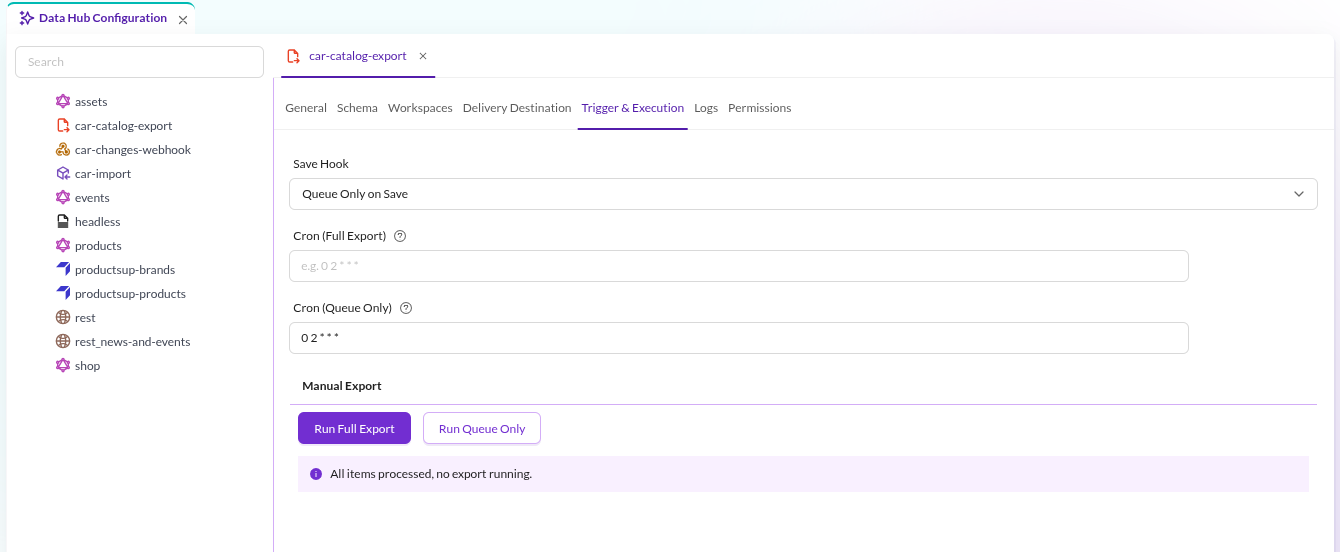

The Manual Export section of the Trigger & Execution tab has one button per export mode, Run Full Export and Run Queue Only. Both run the export asynchronously through the Symfony Messenger queue.
While an export runs, the status line below the buttons reports its progress and a Cancel Export button appears.
The line reads All items processed, no export running. when nothing is pending. The Logs tab shows the log
messages of the export.
Nothing happens until a Symfony Messenger worker consumes the
pimcore_datahub_fileexport transport. An export that appears to hang is usually a missing worker:
bin/console messenger:consume pimcore_datahub_fileexport
Automatic Execution via Cron Definition
The same tab schedules recurring exports with a cron expression, one field per export mode: Cron (Full Export) and
Cron (Queue Only). An empty field means that mode is not scheduled. The export itself is processed through the
Symfony Messenger queue.
See Crontab Guru for building cron expressions.
This requires:
bin/console datahub:export:file:execute-cronon a regular schedule, for example every minute. It checks which cron definitions are due and dispatches the corresponding exports. Pass configuration names as arguments to limit it to those; without arguments it considers all of them.- A
bin/console messenger:consume pimcore_datahub_fileexportworker, as above.
Execution via CLI Command
Run bin/console datahub:export:file directly, for example as a system cron job. Use this when the cron fields are not
flexible enough or the infrastructure requires it.
| Option | Effect |
|---|---|
--config-id | The name of the Datahub configuration to export. Without it, every configuration of type fileExport runs. |
--only-queue-items | Export only items in the queue instead of all relevant items. |
Inactive configurations are skipped either way. Exported queue items are removed from the queue afterwards.
This execution path needs no Symfony Messenger queue; the command performs the export itself.
Next Steps
- Customize and Extend: add formats, transmitters or a custom exporter service.
- Events: hook into the export without replacing a service.