MCP Server Integration
The Simple Rest Datahub provides a Model Context Protocol (MCP) server endpoint, enabling AI agents and LLMs to directly access and query Pimcore data.
Activating MCP Server
MCP server must be enabled per configuration in the Delivery Settings.
- Open your Datahub Simple Rest configuration
- Navigate to Delivery Settings tab
- Activate Enable MCP Server checkbox
- Ensure an API Key is configured (required for authentication)
- Save configuration
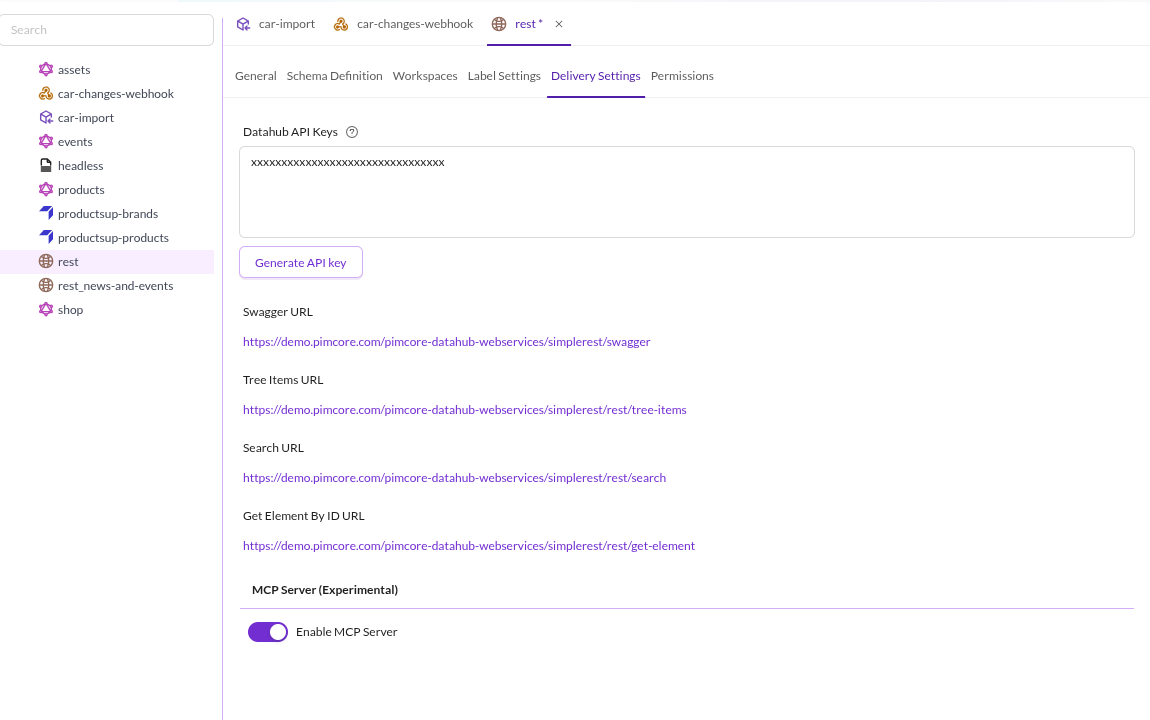

Note: Configuration must be active and have a valid API key for MCP access.
Exposed Capabilities
- The MCP server is available via
https://your-pimcore-instance.com/pimcore-datahub-webservices/simplerest-mcp - Available Datahub endpoints depend on MCP activation and API key (see also Authentication section).
Server instructions
The server sends instructions in its initialize response (InitializeResult.instructions),
which clients MAY fold into the model's system prompt. They summarize the intended tool
workflow - call pimcore_datahub_list_configs first, then pimcore_datahub_get_config_schema
for field discovery, before pimcore_datahub_search/pimcore_datahub_tree_items/
pimcore_datahub_get_by_id - point at the pimcore_datahub_get_query_syntax tool for the
full query syntax (naming the resource only as its host-attachable twin), restate the
fulltext OR default, restate the pagination rule (echo page_cursor back unchanged, alongside
identical other parameters), call out the fields projection parameter for reducing token
usage, mention the asset resource templates for binaries, point at
pimcore_datahub_get_canonical_urls for the case where a human needs a link rather than bytes,
and note that every call requires the same Bearer token. See McpServerBuilder::INSTRUCTIONS
for the exact text.
Tools
pimcore_datahub_list_configs
- Lists all accessible Datahub configurations
- Returns configuration names and descriptions. Use speaking descriptions to help AI agents select the right configuration
pimcore_datahub_search
- Search and retrieve objects and assets from indexed data; folders are never part of search results
(the folder indices are not searched) -
pimcore_datahub_tree_itemslists them - Supports fulltext search, advanced query strings, and filters
- Includes pagination, sorting, and aggregation options
- Returns structured JSON with system metadata and custom fields
- The
filterandorderByparameters are structured objects (not JSON-encoded strings) - see the tool description for their exact shape sizedefaults to 25 and is silently clamped to the[1, 200]range instead of being rejected- Optional
fieldsparameter: a list of field paths (e.g.["system.id", "data.name"]) to project the response down to via Elasticsearch/OpenSearch_sourcefiltering, reducing payload size. Omit it to return all fields (unchanged default behavior). The transitional asset URL rewrite is applied regardless offields:system.id/system.typeare transparently kept in the underlying query and omitted from the response again unless explicitly requested - Full query syntax, filter/orderBy shapes, and the pagination workflow live in the
pimcore_datahub_get_query_syntaxtool rather than being repeated in the tool description
pimcore_datahub_tree_items
- Navigate and browse hierarchical tree structure of objects and assets
- Retrieve child elements under a specific parent node
- Supports filtering and search within a specific branch
- Ideal for tree-based navigation and folder browsing
- Returns items with hasChildren flag for further navigation
- The
filterandorderByparameters are structured objects (not JSON-encoded strings) - see the tool description for their exact shape sizedefaults to 25 and is silently clamped to the[1, 200]range instead of being rejected- Same optional
fieldssource-projection parameter aspimcore_datahub_search - Full query syntax, filter/orderBy shapes, and the pagination workflow live in the
pimcore_datahub_get_query_syntaxtool rather than being repeated in the tool description
pimcore_datahub_get_by_id
- Retrieve a single specific element (object or asset) by its unique ID
- Most direct and efficient way to fetch one known element
- Returns complete data including all configured fields and system metadata
- A
labelsblock, when present, carries the configured display labels per language for the fields that have label settings; languages the settings leave untranslated are omitted (the RESTget-elementresponse repeats the field path there instead), and so is the block when nothing is translated - Essential for detail views, relationship traversal, and data validation
pimcore_datahub_get_config_schema
- Discovers the indexed field schema of a Datahub configuration, so field names and types can be looked up instead of guessed
- Derived from the same Elasticsearch/OpenSearch mapping used to create the indices, so it always matches indexed reality
- Optional
typeparameter (objectorasset) restricts the result to one entity kind - Returns fields grouped by entity type, e.g.
{"entity_types": {"object:Car": {"fields": {...}}, "asset": {"fields": {...}}}}, where eachfieldsmap is a flat"path"->"type"dictionary (internal bookkeeping attributes are excluded). For object entity types, custom fields live underdata.*; for asset entity types, fields are grouped under their own top-level paths instead -dimensionData.*,metaData.*,binaryData.*,xmpData,exifData,iptcData- alongsidesystem.*on both - Call this (and
pimcore_datahub_get_query_syntax) before buildingqueryStringQuery/filter/orderByexpressions for search or tree navigation
pimcore_datahub_get_query_syntax
- Returns the full query-syntax reference as markdown:
fulltextSearchandqueryStringQueryoperators, thefilterobject shape,orderByformats, and thepageCursorpagination workflow - Takes no arguments and reads no data - the document is static, so the call is free of side effects
- Serves the same document as the
pimcore://datahub/query-syntaxresource. Both exist on purpose: MCP resources are application-driven, so most hosts only surface them for explicit user selection and several never expose them to the model at all. A tool is the one primitive every MCP client makes model-callable, which is why the search and tree_items descriptions point at this tool by name instead of at the resource URI - Note that
fulltextSearchcombines terms with OR by default:+is an infix AND,-negates a single token, and*only works as a trailing wildcard. Exclude witha + -b, nota -b
pimcore_datahub_get_canonical_urls
- Resolves the canonical website URLs of assets - the public links a human is meant to open, or a page is meant to embed - as opposed to the bytes an agent dereferences for itself. Agreed with the maintainers in issue #353
- Opt-in per configuration: the configuration must have "Deliver Canonical URLs"
(
schema.assets.allowCanonicalUrl, default off) switched on. While it is off the whole call is refused with an expected error - a canonical URL is the one asset URL this bundle does not access-control, since it points at the public website, so exposing one is an explicit administrative decision rather than a consequence of enabling assets - Takes
configandids, a list of at most 100 numeric asset ids. A longer list is rejected rather than truncated, so the caller never has to guess which ids were dropped - Returns one entry per requested id, keyed by the id as a string:
{"results": {"123": {"status": "ok", "original": "<url>", "thumbnails": {"<name>": "<url>"}}, "456": {"status": "not_found"}}}. Thethumbnailsmap lists exactly the thumbnails the configuration publishes and is empty ({}) for non-image assets.originalis left out when the configuration does not publish the original of an image (Allow original image off), as the download route refuses it too; a thumbnail that Pimcore serves as the original file itself (an SVG that is only scaled) is left out along with it - Every id runs the full check chain on every call - API key scope and activation of
config,schema.assets.enabled, index membership, and a live workspace permission check - i.e. the same chain asset resource reads apply. An id that fails any of them is reported asnot_found, indistinguishable from a nonexistent id, and does not affect the other ids in the same call. Folders resolve tonot_foundtoo: they are indexed, but have no frontend path - URLs come from Pimcore itself with the asset loaded (
Asset::getFrontendFullPath()andAsset\Image\Thumbnail::getPath()), never reconstructed from the indexed document and never prefixed with a guessed host.frontend_prefixesand theASSET_PATH/ASSET_IMAGE_THUMBNAILlisteners therefore see a real subject, and a result is absolute only where those actually make it so - otherwise it is the site-root-relative path, without a host, so configurefrontend_prefixesif the links are to be opened from outside the site - Thumbnail paths are requested with
deferredAllowed: true, so asking for a link never triggers thumbnail generation; the file is rendered on the first real request for it, as usual - Costs one asset load per requested id, and only on this explicit call - nothing changes in search or tree results
Resources
pimcore://datahub/configurations
- Provides configuration metadata as a resource
- Alternative to the list_configs tool
- Returns JSON with available configurations and usage instructions
pimcore://datahub/query-syntax
- Static markdown reference for the
fulltextSearch,queryStringQuery,filter,orderBy, andpageCursorparameters shared bypimcore_datahub_searchandpimcore_datahub_tree_items - Documents operators, ranges, wildcards, fuzzy/proximity/regex syntax, the
filterobject shape,orderByformats, and the full pagination workflow, so this detail lives in one place instead of in every tool's parameter descriptions - Byte-identical to what
pimcore_datahub_get_query_syntaxreturns. Use this resource in hosts where you want to attach the reference explicitly (for example via@mention); agents should call the tool, since resource access is host-controlled rather than model-controlled
Asset resources
Beyond the two static resources above, assets are exposed as MCP resource templates
(RFC 6570 URI templates), dereferenced via
resources/read, rather than only as REST URLs embedded in tool output. This is the "now"
part of issue #287; the
"later" part (tool results returning ResourceLink/ImageContent content blocks instead
of the binaryData JSON field) is blocked on
modelcontextprotocol/php-sdk#399
and not yet implemented.
Only assets the configuration actually publishes can be read: the asset has to be in the
configuration's index (so schema.assets.enabled applies), and the requested variant has to
be one the configuration exposes. Both checks are shared with the REST download-asset
endpoint, so the MCP route never delivers bytes the REST endpoint would refuse. It is the
stricter of the two: on top of the shared checks it re-verifies the workspace permission on every
read (rather than relying on index membership alone) and caps the response size.
pimcore://datahub/{config}/asset/{id}
- The original binary of an asset, identified by Datahub configuration name and numeric
asset id (e.g.
system.idfrom a search/tree/get_by_id result ofsystem.type: "asset") - Returns
BlobResourceContents(base64-encoded bytes) with the asset's MIME type - Requires the configuration's "Allow original image" setting for image assets. Other asset types are always delivered as the original, because the endpoint publishes no thumbnail for them
pimcore://datahub/{config}/asset/{id}/thumbnail/{thumbnail}
- A named thumbnail of an image asset, identified by configuration name, asset id, and thumbnail configuration name
- The thumbnail must be listed in the configuration's own "thumbnails" setting. A thumbnail that merely exists elsewhere in the Pimcore installation is refused, and refused identically whether or not it exists, so the response reveals nothing about thumbnail configurations outside this Data Hub configuration
- A listed thumbnail is additionally resolved against Pimcore's installed thumbnail
configurations (
Asset\Image\Thumbnail\Config::getByName()) - Only valid for
Asset\Imageassets; any other asset type, an unpublished thumbnail, or a listed-but-undefined thumbnail is rejected as an invalid request rather than silently falling back to the original
Resource templates are discovered via resources/templates/list, not resources/list -
there can be millions of assets, so clients construct concrete URIs from ids obtained
elsewhere (search/tree/get_by_id results) rather than enumerating every asset.
Every resources/read call re-validates access, on the same terms as the tools:
- The API key must carry access to
{config}- the sameconfigurationIsAllowed()checkpimcore_datahub_searchand friends perform. An inaccessible or unknown configuration is rejected before the asset is even resolved. - The asset must exist and not be a folder, or the read is rejected as not found.
- The resolved asset must pass the configuration's workspace permission check - the same path the indexer uses when deciding whether to include the asset's binary data in the index at all. An asset outside every workspace the configuration grants read access to is rejected with the same "not found" message as a nonexistent id, so a caller cannot distinguish "doesn't exist" from "exists but you can't see it."
Because permissions are re-checked on every resources/read call rather than baked into
a token with its own expiry, a workspace permission change takes effect on the very next
read - there is no signed-URL-style window where a previously valid link keeps working
after access was revoked.
Reads are capped at 50 MiB by default (AssetResource's $maxResourceBytes constructor
argument, wired in mcp_services.yml), to avoid streaming/base64-encoding an unbounded
blob into the JSON-RPC response. An original exceeding the limit is rejected before its
stream is opened; a thumbnail's size is only known once it has actually been generated
(the same generation getStream() would trigger anyway), so it is checked immediately
after generation and before its bytes are streamed back. Either case surfaces as an
expected error stating the configured limit and the asset's actual size. Host applications
can override the limit via their own service configuration.
Canonical (public website) URLs are a separate, opt-in capability. The URIs above return
bytes into the MCP session and require the session's API key; none of them is a link a human
can open. Neither is the binaryData.*.path REST download path, which is bearer-gated too. The
public website URL of an asset is answered exclusively by the
pimcore_datahub_get_canonical_urls tool, and only for configurations that switched
schema.assets.allowCanonicalUrl on - see
issue #353 for the design
discussion. It applies the same check chain as a resources/read per id, but hands back a URL
instead of a stream and triggers no thumbnail generation.
Argument completions
The server advertises the completions capability and answers completion/complete
requests for the {config} variable of both asset resource templates, and the
{thumbnail} variable of the thumbnail template:
{config}completions list the same configuration namespimcore_datahub_list_configswould report for the current API key (ConfigNameCompletionProvider, backed byDataHubConfigurationService::getAvailableConfigurations()).{thumbnail}completions list the thumbnails published by the accessible configurations that have assets enabled (ThumbnailNameCompletionProvider, backed byAssetVariantPolicy::publishesAssets()andAssetVariantPolicy::publishedThumbnails()). A configuration with assets switched off contributes nothing, since it has no asset index and every read against it is refused regardless of the thumbnail name. The installation's wider thumbnail inventory is never disclosed.
The {thumbnail} list is a union across the accessible configurations rather than an exact
per-configuration list. completion/complete carries a context.arguments object for
already-resolved sibling variables, but mcp/sdk 0.7 does not parse it, so which {config}
the caller is completing for is not knowable in the provider. A name published by one
accessible configuration but not another is still refused at read time by
AssetVariantPolicy::permitsThumbnail(), which remains the authority.
Both providers degrade to an empty suggestion list rather than erroring - {config} if no
request-scoped auth context is available yet, {thumbnail} if the enumeration fails for
any reason (e.g. outside a booted Pimcore kernel) - instead of surfacing a
completion error to the client.
Transitional: absolute asset URLs in tool output
Until the tool-output restructuring lands, pimcore_datahub_search,
pimcore_datahub_tree_items, and pimcore_datahub_get_by_id still return asset
references as a binaryData object per asset item (e.g. binaryData.original,
binaryData.<thumbnail-name>), each with a path field pointing at the REST
download-asset endpoint. Two things are done to that field at MCP response time only,
purely as an interim measure (see issue #287 for the full rationale):
- If
pathis a relative (server-local) path - which it always is, since it is generated at index time with no request/host available - it is rewritten to an absolute URL using the current MCP request's scheme and host. An already-absolutepathis left untouched. This does not fix the underlying problem: the REST endpoint still requires the same Bearer token as the MCP session, so a link forwarded to a human still 401s. Only the agent, which holds the API key, can actually fetch it. Because the host comes from the request,framework.trusted_hostsshould be configured - see Security Considerations. - A sibling
resource_urifield is added next to everybinaryData.*entry, containing the MCP resource URI (pimcore://datahub/{config}/asset/{id}forbinaryData.original,.../thumbnail/{name}for named thumbnails) that can be dereferenced in-session viaresources/read- the durable way to fetch the bytes, unaffected by host changes and re-checked for permissions on every read.
Both the host rewrite and the resource_uri field are removed once tool output moves to
resource_link content blocks and binaryData.*.path is dropped from tool JSON; do not
build long-lived integrations around either.
This rewrite is guaranteed to run even when the fields projection parameter would
otherwise have excluded system.id/system.type: those two fields are transparently
force-included in the underlying query and stripped back out of the response afterward
unless the caller's fields list actually asked for them (directly, via "system", or
via any other "system."-prefixed path).
Error Responses
When a tool fails, it returns a result flagged as an error whose payload carries an error message and a
machine-readable code:
code | Meaning |
|---|---|
invalid_request | The request itself is malformed, for example an unknown configuration name |
access_denied | The API key does not grant access to the requested configuration, or MCP is not enabled for it |
invalid_query | The search backend rejected the query. The message names the offending field or syntax |
internal_error | An unexpected server-side failure. Details are written to the server log only |
Invalid parameter values are rejected before a tool runs, as a JSON-RPC -32602 error rather than a tool result.
This covers a type outside object/asset and a filter or orderBy sent as a string instead of an object.
Requesting no filtering or no sorting
filter and orderBy accept an object or nothing. All three ways of expressing nothing work, so a client that
renders an object parameter as a JSON field does not have to remove the key:
{"config": "my-config"}
{"config": "my-config", "filter": null,  "orderBy": null}
{"config": "my-config", "filter": {},    "orderBy": {}}
A populated JSON list (for example ["system.id"]) is not an object and is rejected with invalid_request.
Authentication
The MCP server accepts two kinds of Bearer credential. Both are sent the same way, and which configurations the caller reaches is decided per credential:
Authorization: Bearer <credential>
| Credential | Identifies | Reaches |
|---|---|---|
| Data Hub API key | nobody, it is a shared secret | every configuration that lists the key |
| OAuth access token | a Pimcore user | every configuration whose OAuth allow-list admits that user |
The OAuth scope for this endpoint is datahub:read. It is advertised in the endpoint's protected
resource metadata and is separate from the mcp:* scopes Pimcore's own MCP servers use, so a
consent screen can say which application is being authorised. A token that was not granted it is
refused with 403 and WWW-Authenticate: Bearer error="insufficient_scope", scope="datahub:read",
which tells the client to authorize again for the scope.
API Key Configuration
- Each configuration has its own API keys (configured in Delivery Settings)
- API key grants access to the specific configuration
- It is possible to define same API key for multiple configurations to allow MCP server access to all of them
OAuth access
API keys are static secrets that have to be pasted into a client by hand. AI chat clients such as Claude instead expect OAuth, which lets a user sign in, see a consent screen, and have the client obtain a token on their behalf.
OAuth applies to both surfaces of this bundle: the REST endpoints and the MCP endpoint. They are
two separate protected resources, because the MCP endpoint sits at a sibling path
(simplerest-mcp) rather than below the REST base, and an RFC 9728 client derives the metadata URL
from the endpoint it was pointed at and then requires the advertised resource to be that endpoint
or a parent of it. A token is therefore bound to the surface it was minted for: one obtained for the
REST API is refused at the MCP endpoint, and the other way round. The same per configuration
allow-list governs both. Pimcore's
embedded OAuth 2.1 authorization server issues
those tokens; this bundle accepts them.
Admission and audience are two different things, and only the first is shared: one allow-list
decides who may connect to either surface, so a user is enabled once, while a client that integrates
both runs the authorization flow twice, naming a different resource each time.
Enable it per configuration, under Delivery Settings > OAuth Access:
- Switch on Enable OAuth access.
- Select the users and roles allowed to use this configuration.
An empty selection means nobody gets in. There is no administrator bypass: an administrator is added to the list like anyone else.
The allow-list stores names, not numeric ids, so a configuration exported to another environment keeps working there.
Requirements:
- The authorization server must be enabled (
pimcore_studio_backend.oauth.enabled). While it is off, OAuth tokens are never claimed and every request takes the API key path. - A credential that is not a valid access token falls through to the API key check, so an existing key keeps working even if it happens to be shaped like a token.
- Nothing else has to change. There is no firewall to add and no
security.yamledit.
A client discovers the server automatically: an unauthenticated request answers 401 with a
WWW-Authenticate header pointing at this endpoint's protected resource metadata, from which the
client finds the authorization server and runs the flow.
A valid token whose user is on no configuration's allow-list answers 403 without a challenge.
Signing in again cannot change that, so add the user, or one of their roles, to the allow-list.
This applies in particular to users created by an OpenID Connect login, which start with no roles.
What OAuth access does and does not decide
The allow-list is admission control: it decides whether a user may connect to a configuration at all. It does not change what the configuration exposes.
Once admitted, the delivered data is exactly what an API key caller would receive: the same workspaces, the same schema, the same asset delivery rules. Pimcore workspace and element permissions are deliberately not applied, so two different users admitted to the same configuration see identical results. If you need per-user data restrictions, model them as separate configurations.
Removing a user from the list takes effect on their next request. Their existing token is not revoked, it simply stops being admitted.
A token is bound to the surface it was minted for. The RFC 8707 resource parameter on the
authorization request is required, and its value names that surface:
| Surface | resource value |
|---|---|
| REST endpoints | <issuer>/pimcore-datahub-webservices/simplerest |
| MCP endpoint | <issuer>/pimcore-datahub-webservices/simplerest-mcp |
<issuer> is pimcore_studio_backend.oauth.issuer, which is required whenever the authorization
server is enabled. Both resources are declared from that setting alone and never from the incoming
request, so a resource built from some other host is refused as unknown rather than accepted as an
audience of its own.
The named value is stamped onto the token as its aud and checked when the token is presented, so a
token minted for one surface is refused at the other, and at every other OAuth protected resource on
the installation, such as Pimcore's own MCP servers.
An authorization request that omits
resource, or names a resource that is not registered, is rejected withinvalid_requestrather than yielding a token, and a token carrying no audience is refused everywhere rather than accepted everywhere. Audience binding is therefore not optional; the per-configuration allow-list is what constrains access on top of it.
Signing in from Swagger UI
The bundled Swagger UI page (/pimcore-datahub-webservices/simplerest/swagger) offers OAuth sign-in once it is
given an OAuth client ID. Register a client for it in the Studio Backend bundle and point this bundle at it:
pimcore_data_hub_simple_rest:
    swagger_oauth_client_id: 'datahub-swagger-ui'

pimcore_studio_backend:
    oauth:
        clients:
            datahub-swagger-ui:
                name: 'Data Hub Simple REST Swagger UI'
                redirect_uris:
                    - '<host>/bundles/pimcoredatahubsimplerest/swagger/oauth2-redirect.html'
<host> is the scheme and host the page is served from, written out in full, because the redirect URI is matched
exactly. Without swagger_oauth_client_id, the Authorize dialog only accepts an API key. Swagger UI signs in
for the REST surface, so the signed-in user has to be on the configuration's allow-list as described above. See
Swagger UI OAuth Authorization for
the details.
Example Integration: VSCode
Add to VSCode configuration (mcp.json):
{
  "servers": {
    "pimcore-simple-rest-mcp": {
      "url": "https://your-pimcore-instance.com/pimcore-datahub-webservices/simplerest-mcp",
      "type": "http",
      "headers": {
        "Authorization": "Bearer YOUR_API_KEY_HERE"
      }
    }
  }
}
Security Considerations
-
MCP server respects workspace permissions configured in the Datahub, no additional data is exposed
-
Asset resource reads (
pimcore://datahub/{config}/asset/{id}and its thumbnail variant) re-check configuration access, index membership, the published variant and workspace permission on everyresources/readcall, not just once at session start - see Asset resources -
Asset delivery is limited to what the configuration publishes, on both the MCP and the REST route: an asset the configuration does not index cannot be fetched through it, and neither can a variant it does not expose (
schema.assets.allowOriginalImage,schema.assets.thumbnails). These settings therefore bound delivery, not just index content -
One exception worth knowing when switching
allowOriginalImageoff for security reasons: for an SVG asset, a published thumbnail whose configuration does not rasterize SVG resolves to the original file, so the original bytes stay reachable through that thumbnail on both routes -
API keys should be kept secure and rotated regularly
-
Each configuration can use a separate API key for granular access control
-
Use HTTPS in production to encrypt API keys in transit
-
Links produced by the transitional host rewrite still require the session's API key to dereference - do not forward them to end users expecting an anonymous, working link
-
That rewrite builds the absolute URL from the current request's scheme and host, which is derived from the
Hostheader. Configure Symfony's trusted hosts (framework.trusted_hosts) so a spoofedHostcannot place an attacker-controlled domain into apaththat an agent may pass on to a human or another system. Host validation is deliberately left to the application or the reverse proxy in front of it, the same division of responsibility the endpoint applies to DNS-rebinding protection. Theresource_urifield carries no host at all and is unaffected, which is one more reason to prefer it overpath -
Rejected API keys are throttled per client IP (30 rejected keys / 5 minute sliding window) to blunt brute-force guessing. Once the limit is reached, the endpoint responds
429 Too Many Requestswith aRetry-Afterheader (seconds) until the window rolls forward. Only a presented but rejected key counts against the limit: a successful authentication clears the client's budget, a request carrying no Bearer token at all (health checks, uptime probes, misconfigured clients) is rejected with401but never charged, and CORS preflight (OPTIONS) requests bypass the limiter entirely. -
The policy can be retuned from the application without patching the bundle. The bundle registers it as a prepended default, so application configuration is merged afterwards and wins:
# config/packages/framework.yaml
framework:
    rate_limiter:
        mcp_auth_failures:
            policy: 'sliding_window'
            limit: 100
interval: '5 minutes' -
The client IP used for throttling comes from
Request::getClientIp(). Configure Symfony's trusted proxies (framework.trusted_proxies/framework.trusted_headers) if the application sits behind a reverse proxy or load balancer. Without it, every client behind the proxy shares a single bucket keyed on the proxy's own IP, so 30 rejected keys from any one client throttle the MCP endpoint for all of them until the window rolls forward.