Versioning
General
Pimcore versions all documents, assets, and data objects automatically. Every save creates a new version with no limit on retained versions unless configured otherwise.
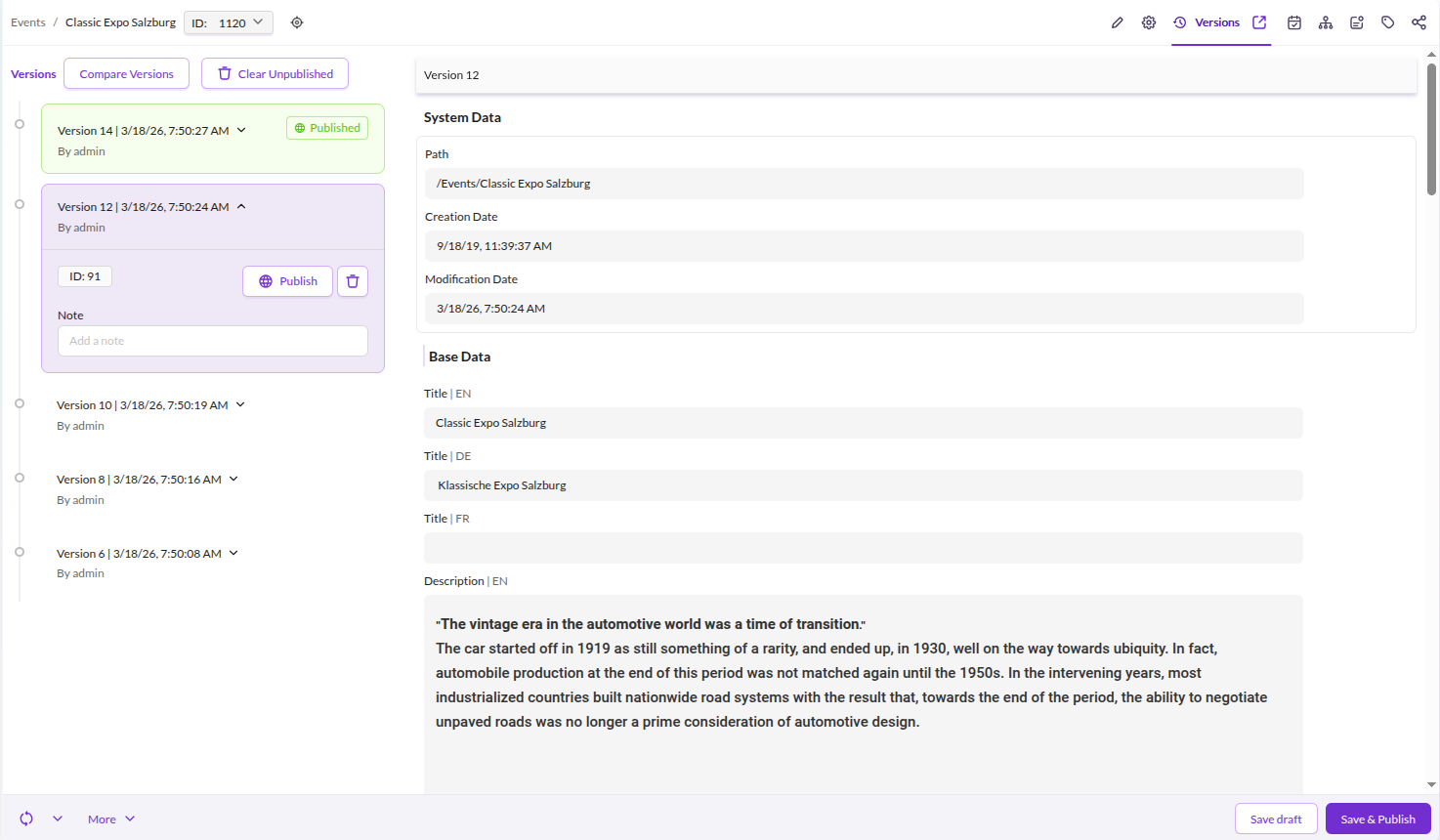
Open the Versions tab on any element to view the change history, compare revisions, and restore or publish a specific version.

Settings
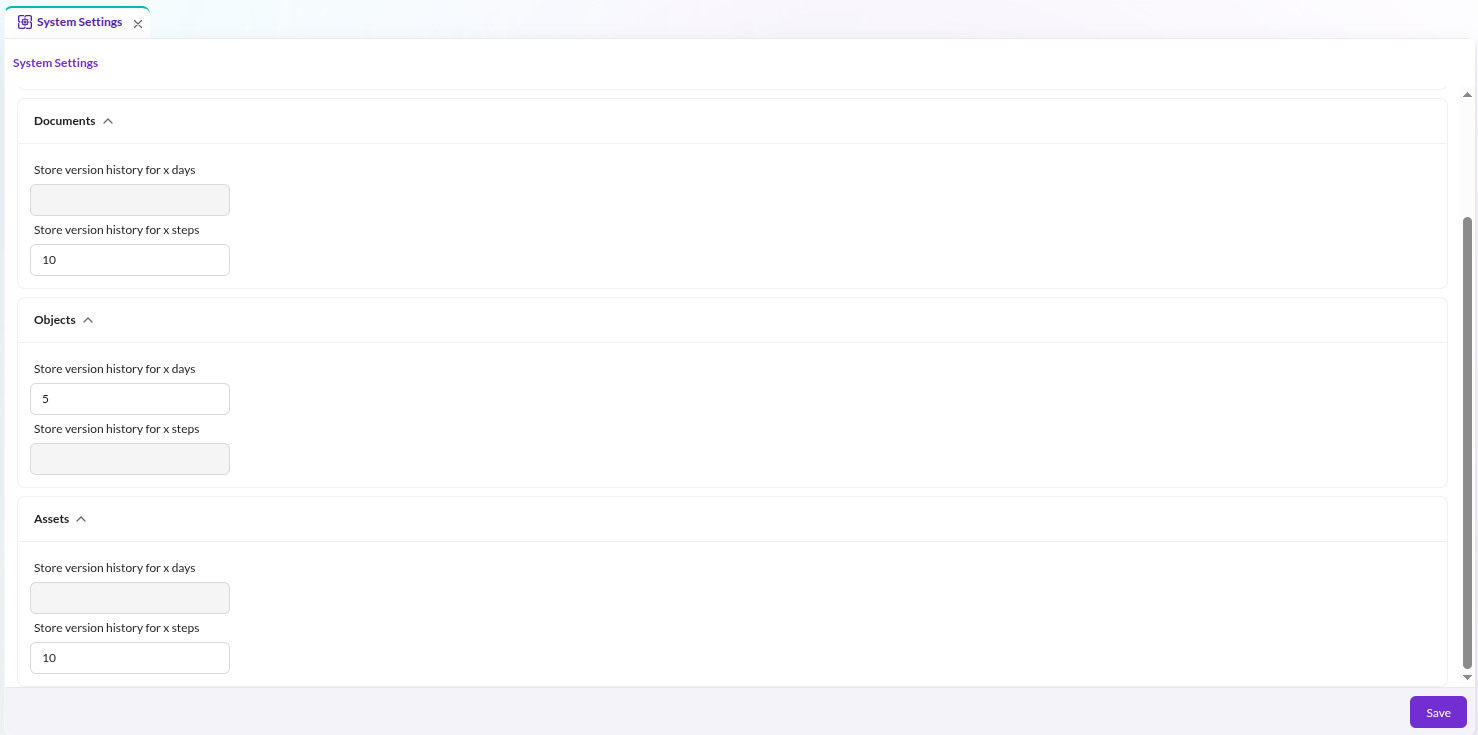
Configure the number of retained versions and the retention period in the system settings for Documents, Assets, and Objects within Pimcore Studio.

Stack Trace
Pimcore stores a stack trace in the database for each version. Disable this per element type:
pimcore:
    assets:
        versions:
            disable_stack_trace: true
    documents:
        versions:
            disable_stack_trace: true
    objects:
        versions:
            disable_stack_trace: true
A maintenance job (VersionsCleanupStackTraceDbTask) automatically removes stack traces older than 7 days.
Skip the Initial Asset Version
By default, a version is created every time an asset is saved, including the very first save when the asset is
uploaded. The version of the initial upload contains a full copy of the binary data, which is wasted storage for
assets that are uploaded once and never modified afterwards (a common case in DAM scenarios). On a local filesystem
this copy is a cheap hardlink (see pimcore.assets.versions.use_hardlinks), but with remote or separate storages
for assets and versions, it is a real copy.
Enable skip_initial_version to create no version when an asset is added:
pimcore:
    assets:
        versions:
            skip_initial_version: true
The original state is not lost: the first time such an asset is modified, Pimcore versions the persisted state (metadata and binary data as they were uploaded) right before applying the change, and then creates the regular version of the modification. Assets that are never modified therefore never occupy version storage, while the upload state of modified assets remains restorable from the Versions tab.
Notes:
- Only assets are affected, versions of documents and data objects don't contain binary data.
- Any save of the asset counts as a modification, including metadata or property changes, moves and renames, and programmatic saves. If the binary data is unchanged, it is stored only once and shared by the versions.
- Assets added while the option is enabled are marked with the custom setting
pimcore-asset-initial-version-skipped, so that their persisted state is also versioned on their first modification after the option has been disabled again. The marker is removed as soon as the asset has a version. - The lazy version of the persisted state is only created for assets that have no versions at all. Assets created while the option was disabled already have their upload version and behave as before; assets whose versions have been removed by the versions cleanup get their persisted state versioned again on the next modification.
- Calling
$asset->saveVersion()directly always creates a version, regardless of this option. For an asset without versions, the persisted state is versioned first, as it is on the first modification. - With versioning disabled for the current process (
\Pimcore\Model\Version::disable(), e.g. in importers), the persisted state is still versioned if the binary data of an asset without versions is replaced, because the original binary data would be lost otherwise. Changes that don't replace the binary data are not versioned in this case, so saves that only add derived data (e.g. image dimensions or video metadata after the upload) create no version. - If the persisted binary data cannot be read from the storage when its lazy version is created, the save is aborted with an exception instead of overwriting the original data. If the binary data doesn't exist on the storage at all, there is nothing to preserve and the asset is saved as usual.
- The lazy version of the persisted state is committed before the save itself. If the save fails afterwards, the version is kept, since the failed save may already have overwritten the binary data on the asset storage. This doesn't apply if the save is wrapped in a database transaction of the caller: the lazy version then becomes part of that transaction and is rolled back with it, while the asset storage (which isn't transactional) keeps the new binary data. Don't roll back such transactions after saving assets whose original state must stay restorable.
- The configured retention policy still applies: with
stepsordaysset to0(keep no versions), the lazy version of the persisted state is not created either.
Version Storage
Every version stores metadata and, if present, binary data. Since version data can grow quickly, Pimcore provides three storage strategies.
Configuration
Filesystem
This is the default. Store version data on the filesystem using FileSystemStorageAdapter:
Pimcore\Model\Version\Adapter\VersionStorageAdapterInterface:
    public: true
    alias: Pimcore\Model\Version\Adapter\FileSystemVersionStorageAdapter

Pimcore\Model\Version\Adapter\FileSystemVersionStorageAdapter: ~
Database
Store version data in a database using DatabaseVersionStorageAdapter.
Pass a configured Doctrine connection as an argument - this allows using a dedicated database for version data only:
Pimcore\Model\Version\Adapter\VersionStorageAdapterInterface:
    public: true
    alias: Pimcore\Model\Version\Adapter\DatabaseVersionStorageAdapter

Pimcore\Model\Version\Adapter\DatabaseVersionStorageAdapter:
    arguments:
        $databaseConnection: '@doctrine.dbal.versioning_connection'
The target database needs a versionsData table. Create it with:
CREATE TABLE `versionsData` (
  `id` bigint(20) unsigned NOT NULL AUTO_INCREMENT,
  `cid` int(11) unsigned DEFAULT NULL,
  `ctype` enum('document','asset','object') DEFAULT NULL,
  `metaData` longblob DEFAULT NULL,
  `binaryData` longblob DEFAULT NULL,
  PRIMARY KEY (`id`)
)
Delegate
Route version data to different storage backends based on size using DelegateVersionStorageAdapter.
When metadata or binary data exceeds the configured byteThreshold, the fallback adapter handles storage:
Pimcore\Model\Version\Adapter\VersionStorageAdapterInterface:
    public: true
    alias: Pimcore\Model\Version\Adapter\DelegateVersionStorageAdapter

Pimcore\Model\Version\Adapter\DelegateVersionStorageAdapter:
    public: true
    arguments:
        $byteThreshold: 1000000
        $defaultAdapter: '@Pimcore\Model\Version\Adapter\DatabaseVersionStorageAdapter'
        $fallbackAdapter: '@Pimcore\Model\Version\Adapter\FileSystemVersionStorageAdapter'

Pimcore\Model\Version\Adapter\FileSystemVersionStorageAdapter: ~

Pimcore\Model\Version\Adapter\DatabaseVersionStorageAdapter:
    arguments:
        $databaseConnection: '@doctrine.dbal.versioning_connection'
In this example, version data up to 1,000,000 bytes goes to the database; larger data falls back to the filesystem.
Element-Type Delegate
Route version data to a different storage per element type (asset, document, object) using
ElementDelegateVersionStorageAdapter. Element types without a configured adapter use the default adapter. For
example, asset and data object versions on an S3 bucket, and document versions on the local filesystem:
flysystem:
    storages:
        pimcore.version_s3.storage:
            adapter: 'aws'
            visibility: private
            options:
                client: 'assets_s3' # an existing S3 client service of your project
                bucket: '%env(S3_PRIVATE_BUCKET)%'
                prefix: versions

services:
    Pimcore\Model\Version\Adapter\VersionStorageAdapterInterface:
        public: true
        alias: Pimcore\Model\Version\Adapter\ElementDelegateVersionStorageAdapter

    app.version_storage.s3:
        class: Pimcore\Model\Version\Adapter\FileSystemVersionStorageAdapter
        arguments:
            $storage: '@pimcore.version_s3.storage'

    # local filesystem, uses the pimcore.version.storage
    Pimcore\Model\Version\Adapter\FileSystemVersionStorageAdapter: ~

    Pimcore\Model\Version\Adapter\ElementDelegateVersionStorageAdapter:
        arguments:
            $adapters:
                asset: '@app.version_storage.s3'
                object: '@app.version_storage.s3'
            $defaultAdapter: '@Pimcore\Model\Version\Adapter\FileSystemVersionStorageAdapter'
Several element types can share one adapter, because the storage paths contain the element type. Any adapter can be used
for an element type, including the size-based DelegateVersionStorageAdapter (e.g. small object versions in the
database, larger ones on S3). Each version records the storage type of the adapter it was written by.
Switching the Storage of Existing Versions
The adapters don't fall back to each other: after changing where the versions of an element type are stored, its
existing versions are still listed, but can't be loaded until their data has been moved to the new storage. Moving
them is project-specific. The steps below work for moves between storages of the same kind, in any direction
(filesystem to filesystem, e.g. from the local filesystem to S3 and back, or database to database). Each version is
loaded by the adapter matching its recorded storage type (versions.storageType, fs or db), so a move between
the database and a filesystem-based storage (including into or out of the size-based DelegateVersionStorageAdapter)
requires converting the data and updating that column, which these steps don't cover.
- Enable the maintenance mode and stop the workers, so that no versions are written in the meantime.
- Copy the data of the re-routed element types to the new storage. For filesystem-based storages these are the
<element type>/directories of the version storage, e.g.aws s3 sync var/versions/asset s3://<bucket>/versions/asset(versionsbeing theprefixof the storage in the example above) orrclone copy. For the database adapter, export and import the rows of the element type from theversionsDatatable. - Deploy the new configuration.
- Verify it, e.g. by opening and restoring a version of each re-routed element type.
- Only once step 4 succeeded, remove the data from the old storage.
Disable Versioning for the Current Process
For bulk operations like imports or third-party synchronizations, disable versioning temporarily:
\Pimcore\Model\Version::disable(); // disable versioning for the current process
\Pimcore\Model\Version::enable(); // re-enable versioning for the current process
This only affects the current PHP process. The setting is not persisted and does not affect other requests.
Coauthor Information
In addition to the user, every version can carry an optional coauthor: a second, machine-readable attribution for saves that a system performed together with the user, for example an AI agent acting on the user's behalf.
A coauthor consists of two fields, both stored on the version:
| Field | Meaning | Example |
|---|---|---|
coauthorType | Short machine string categorizing the coauthor | agent |
coauthor | Free-form identifier of the coauthor | product-data-agent |
Versions without a coauthor store null in both fields. The Versions tab in Pimcore Studio shows a
"Co-authored by" tag on stamped versions.
Setting a Coauthor
The coauthor context is a container service (Pimcore\Model\Version\CoauthorContextInterface). While the
context is active, every newly created version is stamped automatically:
$coauthorContext = \Pimcore::getContainer()->get(\Pimcore\Model\Version\CoauthorContextInterface::class);

// stamp a single save
$coauthorContext->withCoauthor('automation', 'my-importer', fn () => $object->save());

// or stamp everything until clear() is called
try {
    $coauthorContext->set('automation', 'my-importer');
    $object->save();
    $anotherObject->save();
} finally {
    $coauthorContext->clear();
}
In services, inject CoauthorContextInterface instead of accessing the container directly.
Setting the coauthor explicitly via $version->setCoauthorType() / $version->setCoauthor() always wins over
the context. Only newly created versions are stamped; re-saving an existing version never changes its coauthor.
Disable Coauthor Stamping for the Current Process
$coauthorContext->disable(); // suppress stamping, the context values are kept
$coauthorContext->enable();  // resume stamping
This only affects the current PHP process, analogous to Version::disable() above.
Working with the PHP API
When saving elements programmatically, set userModification so the correct user appears in version history.
Set it to 0 to display system as the user:
$object->setUserModification(0);
$object->save();
Retrieve a Previous Version
$versions = $currentObject->getVersions();
$previousVersion = $versions[count($versions)-2];
$previousObject = $previousVersion->getData();