Security Settings
The security settings define how the endpoint is secured and which data is accessible.
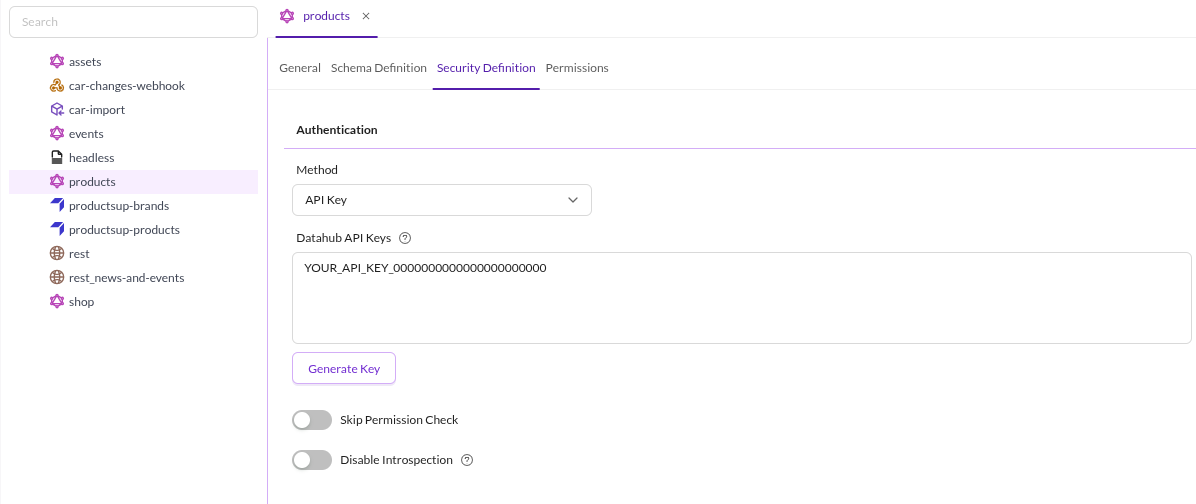

Authentication
The Method defines how requests to the endpoint are authenticated.
Supported Methods
- API Key: needs to be sent with every request.
API Key
Use Generate Key to create an API key. Each click generates a new key and adds it to the Datahub API Keys field alongside any existing keys.
Skip Permission Check
The Skip Permission Check toggle disables the workspace permission checks entirely for this endpoint.
Introspection Settings
Introspection provides an information about queries which are supported by GraphQl schema. If introspection is enabled, the endpoint will provide a schema definition which can be used by GraphiQL or other tools to provide auto-completion and documentation. If introspection is disabled, the schema definition will not be provided and therefore no auto-completion or documentation will be available.
Introspection is enabled by default. Disable it with the Disable Introspection toggle on this tab, or in the Symfony configuration tree:
pimcore_data_hub:
    graphql:
        allow_introspection: false
Workspace Settings
Defines workspaces for data that should be accessible via the endpoint. The definition is similar to Pimcore user workspace permissions.
If no workspace is selected, no directories are accessible.
Available permissions:
- Create
- Read
- Update
- Delete
Error Handling - Configuration Values
The default behavior for associated/related objects, documents or assets that are not visible for the endpoint is, to simply null it out.
You can change that via a configuration setting in symfony configuration tree:
- 1 = the entire query will fail
- 2 = null it out/skip it for multi-relations (default)
pimcore_data_hub:
    graphql:
        not_allowed_policy: 2
It is also possible to disable the permission checks entirely by setting the configuration option in the security definition tab.